> ## Documentation Index
> Fetch the complete documentation index at: https://developers.partoo.co/llms.txt
> Use this file to discover all available pages before exploring further.
# Groups and Sections
> Learn how to organize, filter, and protect your business data in Partoo using Groups, Sections, and role-based access.
## Overview
Use **Groups** and **Sections** to organize your businesses, then create Accesses to control what each `Group Manager` can see and manage.
* **Section** : a logical container that holds multiple Groups (e.g., `Country`, `Service`).
* **Group** : a label you assign to a business (e.g., `France`, `Bakery`).
* **Access** : a set of Groups that defines a **GROUP\_MANAGER**’s permissions.
## Why use Groups?
* **Easy organization** : A business can be part of multiple Groups.
* **Smart filtering** : Mix Groups from different Sections to focus analytics or control permissions.
* **Controlled access** : Give managers access only to the Groups they need.
## Group Architecture
To illustrate the concept more clearly, we'll use a **Zoo Organization** example.\
In this model, animals are categorized across three **Sections** — **Class**, **Continent**, and **Food**. Each Section contains multiple **Groups** (for example, *Birds*, *Europe*, *Omnivore*).
This analogy provides a more comprehensive and relatable way to understand how entities can belong to multiple Groups within different Sections and how filtering logic applies across them.
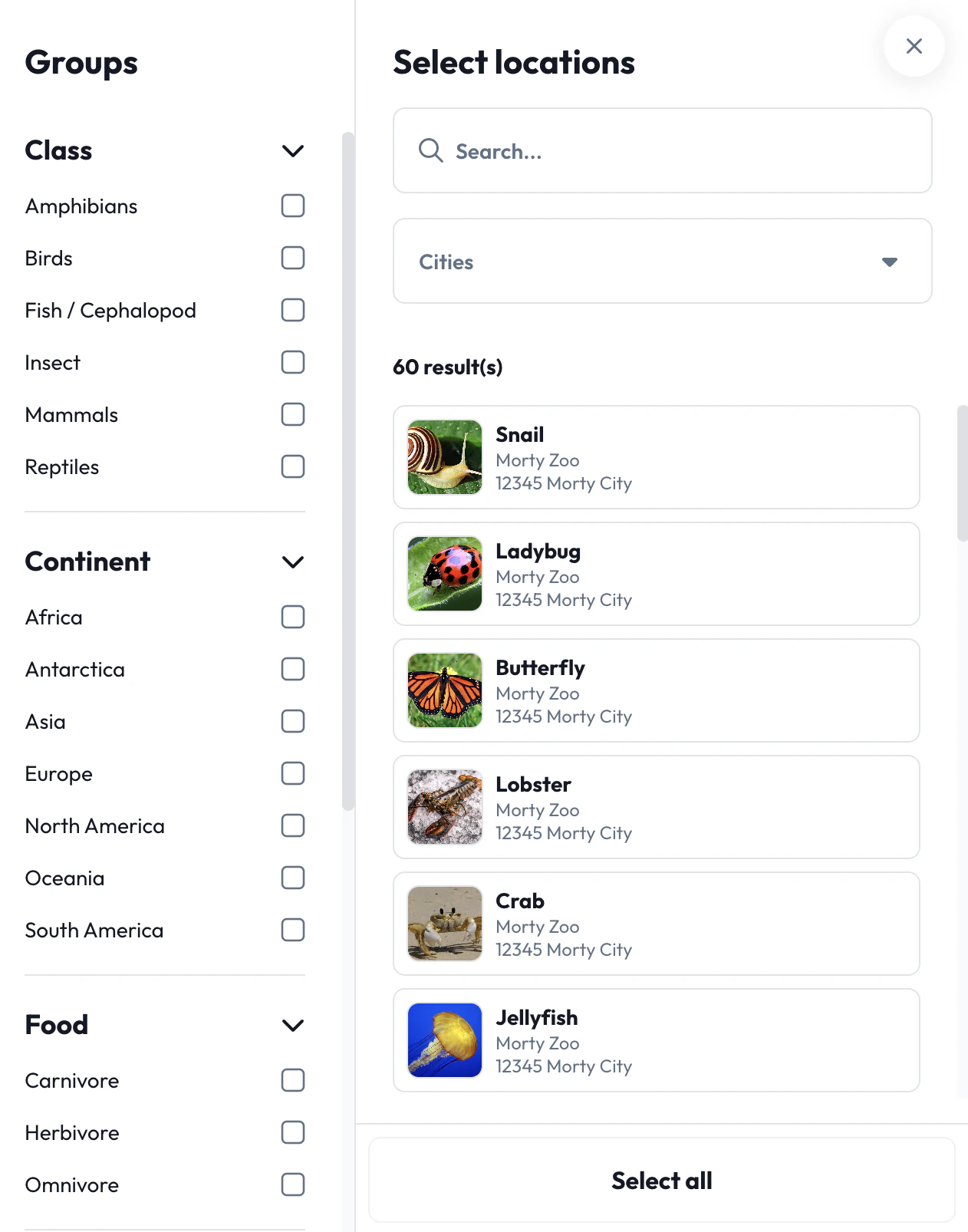 Examples of valid combinations:
* `Birds / Europe / Omnivore`
* `Reptiles / Africa / Carnivore`
* `Fish / Asia / Herbivore`
* `Amphibians / South America`
## Filtering Logic
* **Within one Section** — selecting multiple Groups applies **OR** logic.\
*Example*: `Birds` **OR** `Reptiles` returns animals belonging to either class.
* **Across Sections** — selecting Groups from different Sections applies **AND** logic.\
*Example*: `Europe` **AND** `Birds`**AND** `Omnivore` returns European animals that eat both plants and meat.
This filtering system allows zookeepers and researchers to dynamically explore animal data without redundancy or overlap.
## Accesses for Group Managers
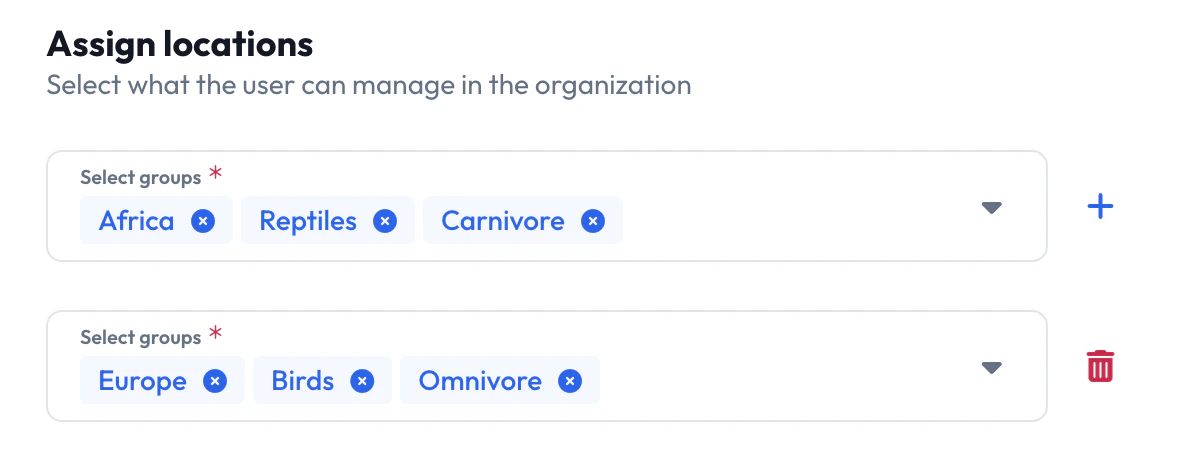
Users with the **GROUP\_MANAGER** role work with predefined Accesses—combinations of Groups that define their scope.
A single manager can hold multiple Accesses:
* All omnivorous birds in Europe
* All carnivorous reptiles in Africa
Examples of valid combinations:
* `Birds / Europe / Omnivore`
* `Reptiles / Africa / Carnivore`
* `Fish / Asia / Herbivore`
* `Amphibians / South America`
## Filtering Logic
* **Within one Section** — selecting multiple Groups applies **OR** logic.\
*Example*: `Birds` **OR** `Reptiles` returns animals belonging to either class.
* **Across Sections** — selecting Groups from different Sections applies **AND** logic.\
*Example*: `Europe` **AND** `Birds`**AND** `Omnivore` returns European animals that eat both plants and meat.
This filtering system allows zookeepers and researchers to dynamically explore animal data without redundancy or overlap.
## Accesses for Group Managers
Users with the **GROUP\_MANAGER** role work with predefined Accesses—combinations of Groups that define their scope.
A single manager can hold multiple Accesses:
* All omnivorous birds in Europe
* All carnivorous reptiles in Africa
 ## Example: Applying Filters
Below are practical outcomes of filter combinations.
| Filters Applied | Example Animals Returned |
| --------------------------------------------------- | ------------------------------------------------------------- |
| `Class: Birds, Reptiles` | Crocodile, Eagle, Hawk, Owl,Canary, Turkey, Sparrow, Chicken |
| `Class: Birds / Continent: Europe / Food: Omnivore` | Canary, Turkey, Sparrow, Chicken |
| `Continent: Europe` | Birds (Eagle, Owl), Fish (Trout), Reptiles (Lizard) |
| `No Filters Applied` | Crab, Snail, Lobster, Jellyfish, and all unclassified animals |
Assign the narrowest Accesses possible. Smaller scopes reduce error risk and improve performance.
## Assign Groups and Accesses via API
You can assign businesses to a group using the create group or update group endpoints.
For a single business, you can specify its groups using the `groups` field during the creation or update of the business using the (create business or update business) endpoints.
You can assign accesses to a `GROUP_MANAGER` user using the `accesses` field during the creation or update of the user using the (create user or update user) endpoints.
If you have any questions about implementing the groups system, please reach out to our technical support team at [api@partoo.fr](mailto:api@partoo.fr).
## Example: Applying Filters
Below are practical outcomes of filter combinations.
| Filters Applied | Example Animals Returned |
| --------------------------------------------------- | ------------------------------------------------------------- |
| `Class: Birds, Reptiles` | Crocodile, Eagle, Hawk, Owl,Canary, Turkey, Sparrow, Chicken |
| `Class: Birds / Continent: Europe / Food: Omnivore` | Canary, Turkey, Sparrow, Chicken |
| `Continent: Europe` | Birds (Eagle, Owl), Fish (Trout), Reptiles (Lizard) |
| `No Filters Applied` | Crab, Snail, Lobster, Jellyfish, and all unclassified animals |
Assign the narrowest Accesses possible. Smaller scopes reduce error risk and improve performance.
## Assign Groups and Accesses via API
You can assign businesses to a group using the create group or update group endpoints.
For a single business, you can specify its groups using the `groups` field during the creation or update of the business using the (create business or update business) endpoints.
You can assign accesses to a `GROUP_MANAGER` user using the `accesses` field during the creation or update of the user using the (create user or update user) endpoints.
If you have any questions about implementing the groups system, please reach out to our technical support team at [api@partoo.fr](mailto:api@partoo.fr).