Learn how to effectively use and manage business categories to improve your local search visibility and connect with customers.
Categories are essential identifiers that describe your business and help customers find you when searching for specific services. They play a crucial role in local search rankings and determine which attributes, services, menus, and place action links are available for your business listings.
Categories are one of the key factors that affect your business’s local
ranking on Google and other directories. Choose them carefully to maximize
your visibility.
Business categories are standardized labels that describe what your business does. They help search engines and directory platforms understand your business type and connect you with relevant customer searches.
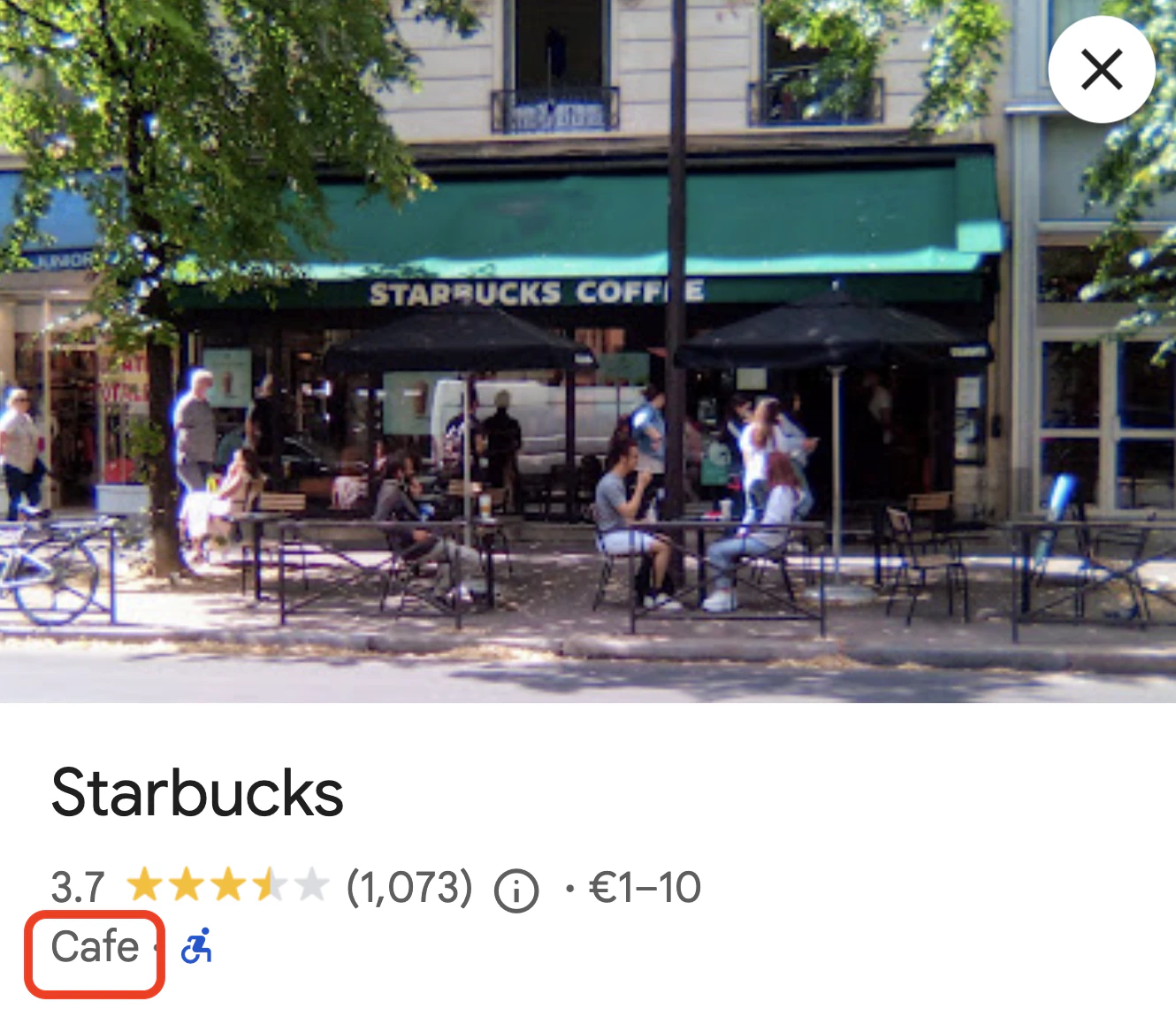
The primary category of your business (highlighted in red) is prominently displayed on your Google Business Profile listing.
Your primary category (first in the list) is the most important. Select the most specific category that accurately describes your core business.Note that your choice of primary category will also affect what Attributes, Services, Menu options, and Place Action Links are available for your business. These are additional details that help customers learn more about your business, such as Wi-Fi available or Outdoor seating for attributes, specific services you offer, the possibility to add a food menu, or actionable links like Order Online.The reason for this is that for certain categories, certain options are more relevant than others. For example, a Coffee Shop might have attributes related to seating options and the possibility of adding a menu, while a Plumber would have attributes related to service areas and specific services offered.
When you select a specific category like “Pizza Restaurant,” your business will also appear in searches for broader related categories like “Restaurant.”
2
Add Relevant Additional Categories
Include up to 10 categories total, but focus on quality over quantity. Each
additional category should represent a genuine service or product you offer.
Order matters for your additional categories since different platforms have
varying limits - some only use your first 3-4 categories. List your most
important additional categories first to ensure they’re included across all
platforms.
Adding irrelevant categories can hurt your local SEO performance.
3
Ensure All of Your Categories Are Relevant
For each category, ask yourself: “If customers search for this category and find my business, will they click?” If the answer is no, don’t use that category.
Each publisher platform has its own category system. We maintain mappings between Google Business Profile categories and equivalent categories on other platforms.
Occasionally, new categories may not have mappings for all publishers. We continuously monitor for these gaps and work to establish appropriate mappings as quickly as possible.
You can easily manage your business categories through the Partoo web application. The interface provides suggestions and allows you to add multiple categories to optimize your local search visibility.
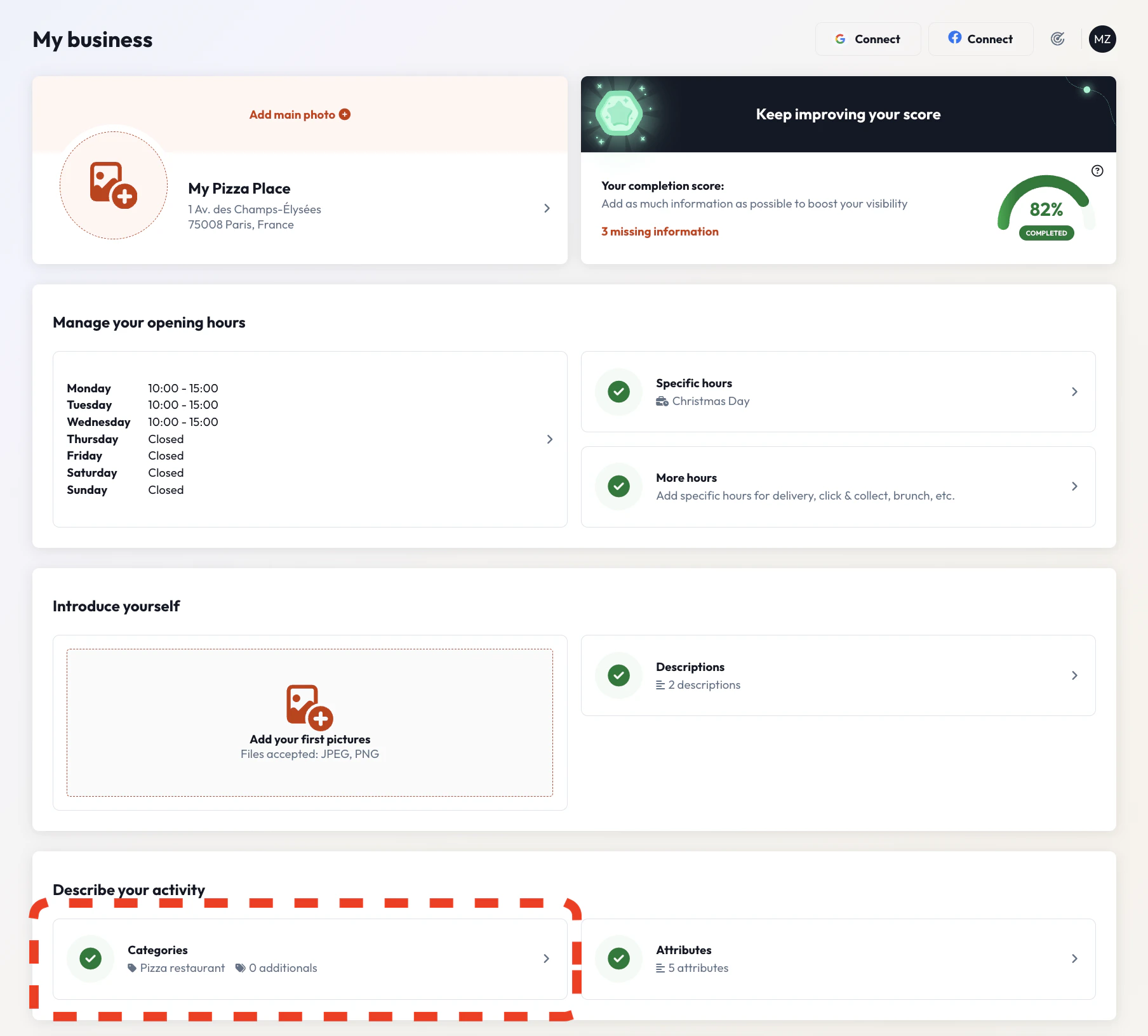
From your dashboard, select the business you want to update categories for. You’ll see the Business Edit page where you can update your business data, including categories.
2
Find the Categories Section
In the “Describe your activity” section, you’ll see the Categories option. This section shows your current primary category and allows you to add additional categories.
The green checkmark indicates that you have at least one category configured for your business.
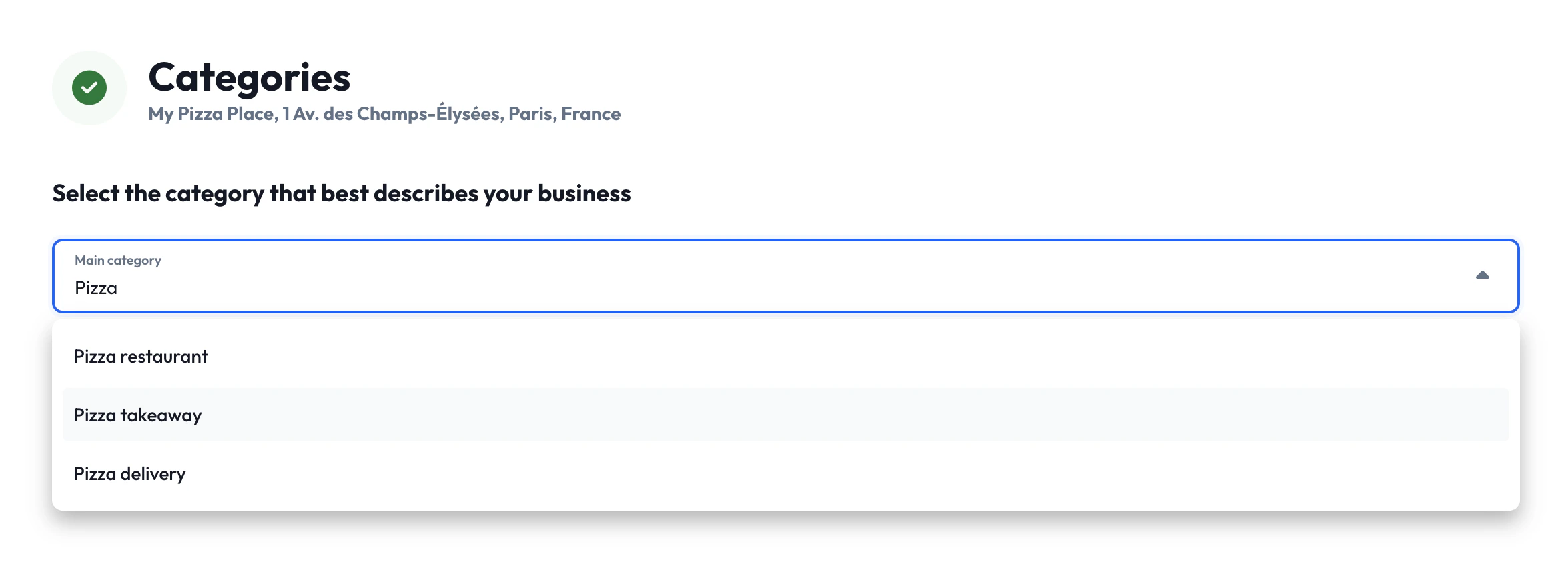
Choose the main category that best describes your business from the dropdown menu. This will be your most important category for search rankings.
Selecting a primary category from the dropdown menu.
2
Add Additional Categories
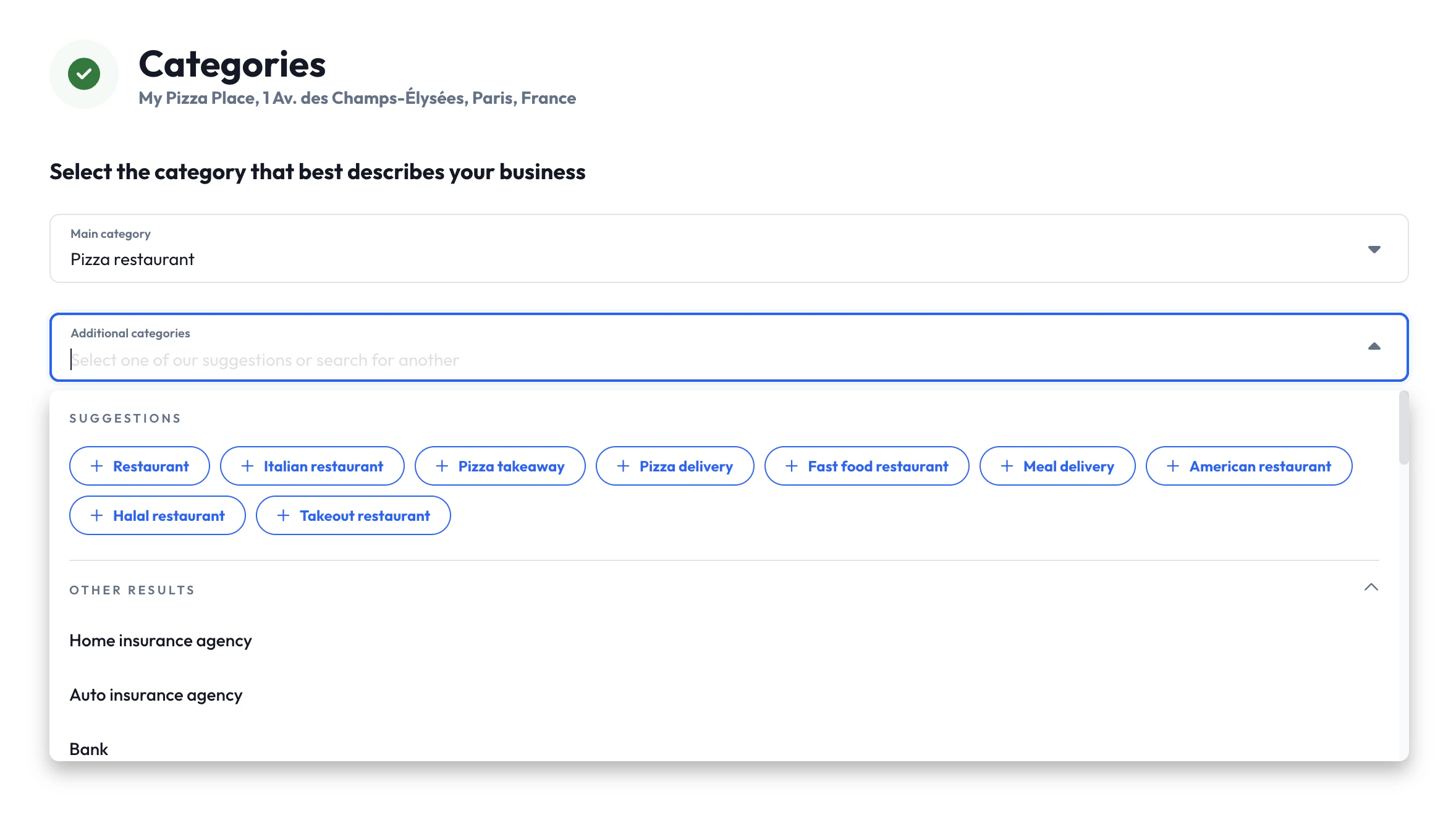
In the “Additional categories” field, you can search for and add additional
categories that represent other services or aspects of your business.
When selecting additional categories, the interface provides intelligent suggestions based on your primary category.
The interface provides intelligent suggestions to help you find relevant
additional categories. These suggestions come from analyzing category
combinations across all businesses on the Partoo platform. For example,
Pizza restaurant businesses commonly also use Pizza delivery, Pizza
takeaway, and Italian restaurant.
3
Review Your Selection
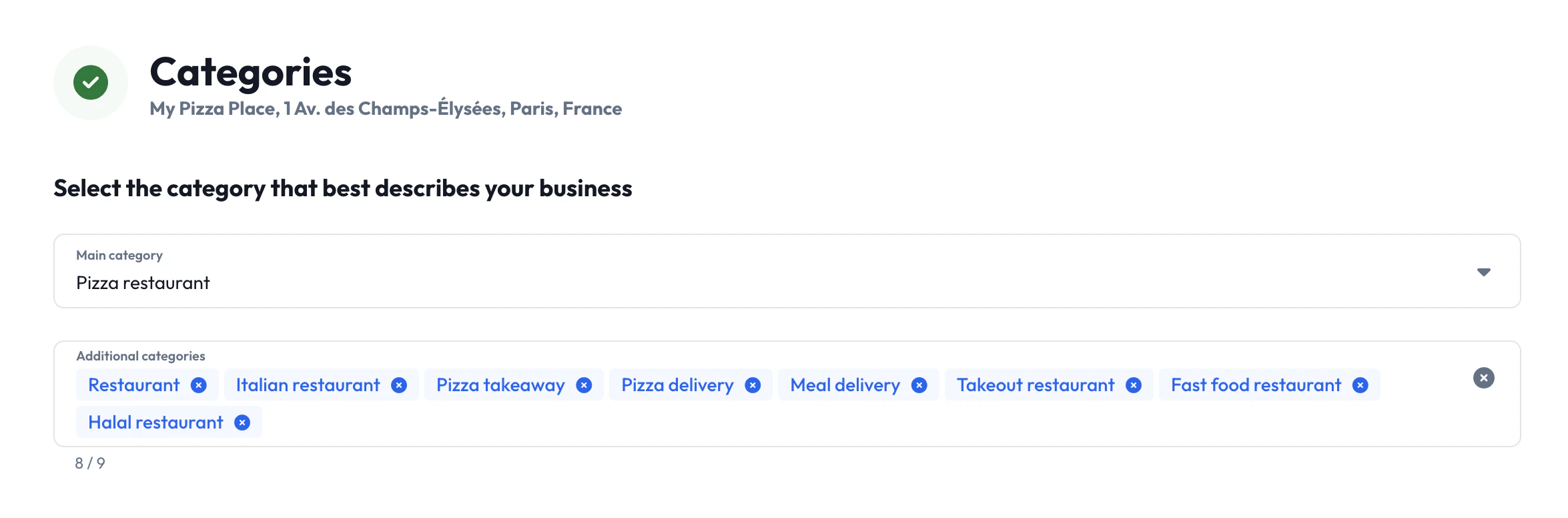
As you add categories, they appear as tags that you can easily remove by
clicking the ”×” button if needed. The interface shows a counter (e.g., “8/9”)
indicating how many categories you’ve selected out of the maximum allowed.
A great selection of primary and additional categories.
Remember that quality is more important than quantity. Choose only
categories that genuinely represent your business offerings.
4
Save Your Changes
After selecting your categories, save your changes to update your business profile across all connected platforms.
Here is how you can use these endpoints together to implement a complete category management workflow:
1
Discover Available Categories
Start by retrieving the available categories to present options to your users:
GET /api/v2/categories?search=restaurant&limit=20
This helps users find relevant categories by searching or browsing the complete catalog.
2
Get Category Suggestions
Once a user selects a primary category, get intelligent suggestions for
additional categories:
GET /api/v2/categories/{primary_category_id}/suggested
These suggestions are based on the most commonly used
additional categories by businesses with the same primary category.
3
Create or Update Business
Apply the selected categories to a business using either endpoint:For new businesses:
POST /api/v2/businesses{ "name": "My Pizza Place", "categories": [ # The first category of the array is always the primary category "gcid:pizza_restaurant", # Additional categories "gcid:italian_restaurant", "gcid:pizza_delivery_service" ], // ... other business data}
For existing businesses:
POST /api/v2/businesses/{business_id}{ "categories": [ "gcid:pizza_restaurant", "gcid:italian_restaurant", "gcid:pizza_delivery_service", "gcid:pizza_takeout_service" ]}
The first category in the array is treated as the primary category, which
determines available attributes, services, menus, and place action links, and
has the strongest impact on search rankings. Additional categories are treated
as additional categories.
Use the suggestions endpoint to provide the same intelligent category
recommendations in your application that users experience in the Partoo web
interface.
Can I add my own categories to the Partoo catalog?
No, we do not accept requests to add custom categories to our catalog. This is to ensure data quality and to prevent the use of invalid categories that could harm your business’s search performance.
How many categories should I use?
We recommend 5-10 relevant categories. Your primary category is most
important, followed by additional categories that accurately represent
additional services or products you offer. Adding irrelevant categories can
hurt your local SEO performance.
What if I can't find a suitable category?
Google Business Profile’s category directory is comprehensive and should
contain relevant options for any business type. Try searching for broader
terms or synonyms if specific terms don’t yield results.
Why are some attributes, services, menus, or place action links not available for my business?
Your primary category determines which Google Business Profile attributes,
services, menus, and place action links are available. Consider if a different
primary category would unlock the needed data options for your business.
Do categories affect all publisher platforms equally?
No, different publishers have varying category limits and systems. While
Google accepts up to 10 categories, other platforms may only use your primary
category or the first few categories from your list.
What happens if Google removes a category I'm using?
We continuously monitor for category changes from Google Business Profile. Here’s what happens when Google removes a category:Immediate Impact:
The category is automatically marked as obsolete in our system
Updates to your Google Business Profile listing may temporarily fail
Our Response:
Our team actively works to identify the most appropriate alternative category
We assign the replacement category to restore full functionality as quickly as possible
The obsolete category is replaced with the new one for all affected businesses still using the old, obsolete category
We apologize for any inconvenience this may cause. The obsoletion of categories is caused by changes outside of our control, as we strive to always maintain accurate and effective category mappings.
Need help with category selection or experiencing issues? Contact our support team for personalized assistance with optimizing your business categories.
Was this page helpful?
{"docsConfig":{"theme":"mint","$schema":"https://mintlify.com/docs.json","name":"Partoo API","colors":{"primary":"#0266F1","light":"#0266F1","dark":"#0266F1"},"logo":{"light":"https://mintcdn.com/partoo/TsLSUe0VyG69h3IT/assets/logo/partoo_logo_light.svg?fit=max\u0026auto=format\u0026n=TsLSUe0VyG69h3IT\u0026q=85\u0026s=c2706dd9b3d972be1546dde374b38064","dark":"https://mintcdn.com/partoo/TsLSUe0VyG69h3IT/assets/logo/partoo_logo_dark.svg?fit=max\u0026auto=format\u0026n=TsLSUe0VyG69h3IT\u0026q=85\u0026s=dfa0b161e3b8ff41e718c7a54adac157"},"favicon":"https://mintcdn.com/partoo/KeL2LkyU0Aa40gpF/assets/favicon.png?fit=max\u0026auto=format\u0026n=KeL2LkyU0Aa40gpF\u0026q=85\u0026s=0f76461469f69f649f6d0e2b92540b8f","background":{"decoration":"windows"},"navbar":{"primary":{"type":"button","label":"Go to app","href":"https://app.partoo.co/connection"}},"footer":{"socials":{"website":"https://www.partoo.co/en","linkedin":"https://www.linkedin.com/company/partoo","youtube":"https://www.youtube.com/channel/UC9ET1Ec9XVXKEeBX2dMOvUw"}},"integrations":{"ga4":{"measurementId":"G-SP9LKMW0WX"}},"contextual":{"options":["copy","view","chatgpt"],"display":"header"},"styling":{"latex":false},"navigation":{"global":{"anchors":[{"anchor":"Contact Us","icon":"envelope","href":"/misc/help/how-to-get-help"},{"anchor":"Status Page","icon":"wrench","href":"https://status.partoo.co"},{"anchor":"OpenAPI Spec","icon":"download","href":"/misc/help/openapi-download"}]},"pages":[]}},"deployment":{"deploymentMetadataValue":{"subdomain":"partoo","hasAudioNarration":false,"actualSubdomain":"partoo","customDomains":["developers.partoo.co"],"gitSource":{"type":"github","owner":"partoohub","repo":"partoo-api-docs","deployBranch":"master","contentDirectory":"","isPrivate":true,"mountPath":"","label":""},"chroma":{"liveDeploymentHistoryId":"6acf495fc81dc1de95a9da35","collectionId":"a55b5a43-8819-4431-9705-432d9bebd6dd","schemaVersion":"v3","latestBuiltDeploymentHistoryId":"6acf495fc81dc1de95a9da35"},"feedback":{"thumbs":true},"entitlements":{"AI_CHAT":{"status":"ENABLED"},"WEB_MCP":{"status":"ENABLED"},"NARRATION":{"status":"ENABLED"}},"buildId":"6acf495fc81dc1de95a9da35","clientVersion":"0.0.3952","searchFilterCounts":[{"language":"default","tag":"API Reference","count":186},{"language":"default","tag":"API Guides","count":33},{"language":"default","tag":"Businesses","count":30},{"language":"default","tag":"Resources","count":21},{"language":"default","tag":"Webhooks Events","count":20},{"language":"default","tag":"Reviews","count":15},{"language":"default","tag":"Feedback Management","count":14},{"language":"default","tag":"Settings","count":12},{"language":"default","tag":"Webhooks","count":12},{"language":"default","tag":"Users","count":10}]},"assistantConfig":{"enableAskAiButton":true,"enableAskAiSearchBar":false,"deflection":{"enabled":true,"email":"api@partoo.fr","showHelpButton":true}},"hasChatPermissions":true,"hasWebMcpPermissions":true,"toggles":[{"name":"kill-isr","enabled":true,"variant":{"name":"disabled","enabled":false,"feature_enabled":true},"impressionData":false},{"name":"agent-mintlify-slack","enabled":true,"variant":{"name":"disabled","enabled":false,"feature_enabled":true},"impressionData":false},{"name":"editor-v7-file-tree","enabled":true,"variant":{"name":"disabled","enabled":false,"feature_enabled":true},"impressionData":false},{"name":"agent-integrations-settings","enabled":true,"variant":{"name":"disabled","enabled":false,"feature_enabled":true},"impressionData":false},{"name":"automations-pr-grouping","enabled":true,"variant":{"name":"disabled","enabled":false,"feature_enabled":true},"impressionData":false},{"name":"custom-prefix","enabled":true,"variant":{"name":"disabled","enabled":false,"feature_enabled":true},"impressionData":false},{"name":"analytics-v7","enabled":true,"variant":{"name":"disabled","enabled":false,"feature_enabled":true},"impressionData":false},{"name":"user-flows-analytics","enabled":true,"variant":{"name":"disabled","enabled":false,"feature_enabled":true},"impressionData":false},{"name":"no-publish-flow","enabled":true,"variant":{"name":"disabled","enabled":false,"feature_enabled":true},"impressionData":false},{"name":"workos-onboarding","enabled":true,"variant":{"name":"disabled","enabled":false,"feature_enabled":true},"impressionData":false},{"name":"llms-txt-v2","enabled":true,"variant":{"name":"disabled","enabled":false,"feature_enabled":true},"impressionData":false},{"name":"pause-universal-search-reconcile","enabled":true,"variant":{"name":"disabled","enabled":false,"feature_enabled":true},"impressionData":false},{"name":"snapshot-serving-live","enabled":true,"variant":{"name":"disabled","enabled":false,"feature_enabled":true},"impressionData":false},{"name":"stripTemperatureMiddleware","enabled":true,"variant":{"name":"disabled","enabled":false,"feature_enabled":true},"impressionData":false},{"name":"per-site-search-delta","enabled":true,"variant":{"name":"disabled","enabled":false,"feature_enabled":true},"impressionData":false},{"name":"support-platform-pylon-zendesk","enabled":true,"variant":{"name":"disabled","enabled":false,"feature_enabled":true},"impressionData":false},{"name":"snapshot-serving","enabled":true,"variant":{"name":"disabled","enabled":false,"feature_enabled":true},"impressionData":false},{"name":"instant-rollback","enabled":true,"variant":{"name":"disabled","enabled":false,"feature_enabled":true},"impressionData":false},{"name":"granular-notifications-server","enabled":true,"variant":{"name":"disabled","enabled":false,"feature_enabled":true},"impressionData":false},{"name":"granular-notifications","enabled":true,"variant":{"name":"disabled","enabled":false,"feature_enabled":true},"impressionData":false},{"name":"editor-private-page-search","enabled":true,"variant":{"name":"disabled","enabled":false,"feature_enabled":true},"impressionData":false},{"name":"automations-fable","enabled":true,"variant":{"name":"disabled","enabled":false,"feature_enabled":true},"impressionData":false},{"name":"fixed-ai-action-pricing","enabled":true,"variant":{"name":"disabled","enabled":false,"feature_enabled":true},"impressionData":false},{"name":"automation-resolve-merge-conflict","enabled":true,"variant":{"name":"disabled","enabled":false,"feature_enabled":true},"impressionData":false},{"name":"scoped-publishing","enabled":true,"variant":{"name":"disabled","enabled":false,"feature_enabled":true},"impressionData":false},{"name":"mintql","enabled":true,"variant":{"name":"disabled","enabled":false,"feature_enabled":true},"impressionData":false},{"name":"page-level-analytics","enabled":true,"variant":{"name":"disabled","enabled":false,"feature_enabled":true},"impressionData":false},{"name":"editor-version-history-v2","enabled":true,"variant":{"name":"disabled","enabled":false,"feature_enabled":true},"impressionData":false},{"name":"editor-nav-generations","enabled":true,"variant":{"name":"disabled","enabled":false,"feature_enabled":true},"impressionData":false},{"name":"billing-page-v2","enabled":true,"variant":{"name":"disabled","enabled":false,"feature_enabled":true},"impressionData":false},{"name":"workspace-projects","enabled":true,"variant":{"name":"disabled","enabled":false,"feature_enabled":true},"impressionData":false},{"name":"assistant-v5","enabled":true,"variant":{"name":"disabled","enabled":false,"feature_enabled":true},"impressionData":false},{"name":"byok-sep-25","enabled":true,"variant":{"name":"disabled","enabled":false,"feature_enabled":true},"impressionData":false},{"name":"fork-pr-previews","enabled":true,"variant":{"name":"disabled","enabled":false,"feature_enabled":true},"impressionData":false},{"name":"revalidation-jwt","enabled":true,"variant":{"name":"disabled","enabled":false,"feature_enabled":true},"impressionData":false},{"name":"vite-origin","enabled":true,"variant":{"name":"disabled","enabled":false,"feature_enabled":true},"impressionData":false},{"name":"editor-agent-model-picker","enabled":true,"variant":{"name":"disabled","enabled":false,"feature_enabled":true},"impressionData":false},{"name":"billing-updated-9-15","enabled":true,"variant":{"name":"disabled","enabled":false,"feature_enabled":true},"impressionData":false},{"name":"hobby-abuse-scan","enabled":true,"variant":{"name":"disabled","enabled":false,"feature_enabled":true},"impressionData":false},{"name":"dashboard-inbox","enabled":true,"variant":{"name":"disabled","enabled":false,"feature_enabled":true},"impressionData":false}],"isAtlas":false,"googleFontsInlined":false},"customCss":[{"filePath":"assets/css/custom.css","content":"@font-face{font-family:\"Outfit\";font-style:normal;font-weight:100;src:url(../font/Outfit-Thin.ttf) format(\"truetype\");font-display:swap}@font-face{font-family:\"Outfit\";font-style:normal;font-weight:200;src:url(../font/Outfit-ExtraLight.ttf) format(\"truetype\");font-display:swap}@font-face{font-family:\"Outfit\";font-style:normal;font-weight:300;src:url(../font/Outfit-Light.ttf) format(\"truetype\");font-display:swap}@font-face{font-family:\"Outfit\";font-style:normal;font-weight:400;src:url(../font/Outfit-Regular.ttf) format(\"truetype\");font-display:swap}@font-face{font-family:\"Outfit\";font-style:normal;font-weight:500;src:url(../font/Outfit-Medium.ttf) format(\"truetype\");font-display:swap}@font-face{font-family:\"Outfit\";font-style:normal;font-weight:600;src:url(../font/Outfit-SemiBold.ttf) format(\"truetype\");font-display:swap}@font-face{font-family:\"Outfit\";font-style:normal;font-weight:700;src:url(../font/Outfit-Bold.ttf) format(\"truetype\");font-display:swap}@font-face{font-family:\"Outfit\";font-style:normal;font-weight:800;src:url(../font/Outfit-ExtraBold.ttf) format(\"truetype\");font-display:swap}@font-face{font-family:\"Outfit\";font-style:normal;font-weight:900;src:url(../font/Outfit-Black.ttf) format(\"truetype\");font-display:swap}h1{font-size:30px;font-weight:700}#sidebar-title,.mdx-content,body,h1,h2,h3,h4,h5,h6{font-family:\"Outfit\",sans-serif}#sidebar-title,.mdx-content{font-size:17px}#sidebar-title{font-size:13px;font-weight:600;text-transform:uppercase;line-height:24px}.sidebar-group-icon{width:20px;height:20px}#navigation-items,#sidebar-group{display:flex;flex-direction:column;gap:4px}#sidebar-group>li,.sidebar-group>li{font-family:\"Outfit\",sans-serif;font-size:15px}.sidebar-group+.sidebar-group,li[data-group-tag]>ul>li+li{margin-top:4px}[data-component-part=callout-content]>*{font-size:15px}[data-component-part=callout-content] b,[data-component-part=callout-content] strong{color:inherit}#footer>div.flex.items-center.justify-between:nth-of-type(2){display:none}.effective-tag{display:inline-flex;align-items:center;gap:6px;margin-bottom:14px;padding:3px 12px;border-radius:9999px;background-color:#fef3c7;color:#92400e;border:1px solid #fcd34d;font-family:\"Outfit\",sans-serif;font-size:13px;font-weight:600;line-height:1.5;white-space:nowrap}.dark .effective-tag{background-color:rgba(120,53,15,.35);color:#fcd34d;border-color:rgba(180,83,9,.6)}"}],"page":{"pagePath":"guides/api/resources/businesses/categories","slug":"/guides/api/resources/businesses/categories","pageMetadata":{"title":"Categories","description":"Learn how to effectively use and manage business categories to improve your local search visibility and connect with customers.","href":"/guides/api/resources/businesses/categories"},"description":{"compiledSource":"\"use strict\";\nconst {jsx: _jsx} = arguments[0];\nconst {useMDXComponents: _provideComponents} = arguments[0];\nfunction _createMdxContent(props) {\n const _components = {\n p: \"p\",\n ..._provideComponents(),\n ...props.components\n };\n return _jsx(_components.p, {\n children: \"Learn how to effectively use and manage business categories to improve your local search visibility and connect with customers.\"\n });\n}\nfunction MDXContent(props = {}) {\n const {wrapper: MDXLayout} = {\n ..._provideComponents(),\n ...props.components\n };\n return MDXLayout ? _jsx(MDXLayout, {\n ...props,\n children: _jsx(_createMdxContent, {\n ...props\n })\n }) : _createMdxContent(props);\n}\nreturn {\n default: MDXContent\n};\n","frontmatter":{},"scope":{}},"pageType":"default","mdx":{"mdxSource":{"compiledSource":"\"use strict\";const{Fragment:_Fragment,jsx:_jsx,jsxs:_jsxs}=arguments[0];const{useMDXComponents:_provideComponents}=arguments[0];function _createMdxContent(props){const _components={a:`a`,code:`code`,em:`em`,hr:`hr`,li:`li`,p:`p`,pre:`pre`,span:`span`,strong:`strong`,tbody:`tbody`,td:`td`,th:`th`,thead:`thead`,tr:`tr`,ul:`ul`,..._provideComponents(),...props.components},{Accordion,AccordionGroup,Check,CodeBlock,Frame,Heading,Note,OptimizedImage,Step,Steps,Table,Tip,Warning}=_components;if(!Accordion)_missingMdxReference(`Accordion`,true);if(!AccordionGroup)_missingMdxReference(`AccordionGroup`,true);if(!Check)_missingMdxReference(`Check`,true);if(!CodeBlock)_missingMdxReference(`CodeBlock`,true);if(!Frame)_missingMdxReference(`Frame`,true);if(!Heading)_missingMdxReference(`Heading`,true);if(!Note)_missingMdxReference(`Note`,true);if(!OptimizedImage)_missingMdxReference(`OptimizedImage`,true);if(!Step)_missingMdxReference(`Step`,true);if(!Steps)_missingMdxReference(`Steps`,true);if(!Table)_missingMdxReference(`Table`,true);if(!Tip)_missingMdxReference(`Tip`,true);if(!Warning)_missingMdxReference(`Warning`,true);return _jsxs(_Fragment,{children:[_jsx(_components.p,{children:`Categories are essential identifiers that describe your business and help customers find you when searching for specific services. They play a crucial role in local search rankings and determine which attributes, services, menus, and place action links are available for your business listings.`}),`\n`,_jsx(Note,{children:_jsx(_components.p,{children:`Categories are one of the key factors that affect your business’s local\nranking on Google and other directories. Choose them carefully to maximize\nyour visibility.`})}),`\n`,_jsx(Heading,{level:`2`,id:`understanding-categories`,children:`Understanding Categories`}),`\n`,_jsx(Heading,{level:`3`,id:`what-are-business-categories`,children:`What Are Business Categories?`}),`\n`,_jsx(_components.p,{children:`Business categories are standardized labels that describe what your business does. They help search engines and directory platforms understand your business type and connect you with relevant customer searches.`}),`\n`,_jsx(Frame,{caption:`The primary category of your business (highlighted in red) is prominently displayed on your Google Business Profile listing.`,children:_jsx(OptimizedImage,{src:`https://mintcdn.com/partoo/P_Jb4Af_6Al7QkYi/assets/images/guides/api/resources/businesses/categories/google-business-profile-category.png?fit=max\u0026auto=format\u0026n=P_Jb4Af_6Al7QkYi\u0026q=85\u0026s=e15d5408264365a01a0979542804e80d`,alt:`Screenshot showing the display of the main business category on a Google Business Profile listing`,\"data-og-width\":`1330`,width:`1330`,\"data-og-height\":`1158`,height:`1158`,\"data-path\":`assets/images/guides/api/resources/businesses/categories/google-business-profile-category.png`,\"data-optimize\":`true`,\"data-opv\":`3`,srcset:`https://mintcdn.com/partoo/P_Jb4Af_6Al7QkYi/assets/images/guides/api/resources/businesses/categories/google-business-profile-category.png?w=280\u0026fit=max\u0026auto=format\u0026n=P_Jb4Af_6Al7QkYi\u0026q=85\u0026s=3d2548d70a08010093defe588a42dc3f 280w, https://mintcdn.com/partoo/P_Jb4Af_6Al7QkYi/assets/images/guides/api/resources/businesses/categories/google-business-profile-category.png?w=560\u0026fit=max\u0026auto=format\u0026n=P_Jb4Af_6Al7QkYi\u0026q=85\u0026s=c011860f6ef7794657f9162e8394f6d3 560w, https://mintcdn.com/partoo/P_Jb4Af_6Al7QkYi/assets/images/guides/api/resources/businesses/categories/google-business-profile-category.png?w=840\u0026fit=max\u0026auto=format\u0026n=P_Jb4Af_6Al7QkYi\u0026q=85\u0026s=03dbfb601a2bc9fc2d361fa1fe21dc2a 840w, https://mintcdn.com/partoo/P_Jb4Af_6Al7QkYi/assets/images/guides/api/resources/businesses/categories/google-business-profile-category.png?w=1100\u0026fit=max\u0026auto=format\u0026n=P_Jb4Af_6Al7QkYi\u0026q=85\u0026s=3d47bea382d86ab3ea63e0205e5b2bf0 1100w, https://mintcdn.com/partoo/P_Jb4Af_6Al7QkYi/assets/images/guides/api/resources/businesses/categories/google-business-profile-category.png?w=1650\u0026fit=max\u0026auto=format\u0026n=P_Jb4Af_6Al7QkYi\u0026q=85\u0026s=57a958908550e384032123d69a1f393b 1650w, https://mintcdn.com/partoo/P_Jb4Af_6Al7QkYi/assets/images/guides/api/resources/businesses/categories/google-business-profile-category.png?w=2500\u0026fit=max\u0026auto=format\u0026n=P_Jb4Af_6Al7QkYi\u0026q=85\u0026s=cb856ce89e2c649679fadf0140e11ad6 2500w`})}),`\n`,_jsx(Heading,{level:`3`,id:`why-categories-matter`,children:`Why Categories Matter`}),`\n`,_jsxs(_components.ul,{children:[`\n`,_jsxs(_components.li,{children:[_jsx(_components.strong,{children:`Local search ranking`}),`: Categories directly influence how well your business ranks in local search results`]}),`\n`,_jsxs(_components.li,{children:[_jsx(_components.strong,{children:`Data availability`}),`: Your selected categories determine which Google Business Profile attributes, services, menus, and place action links you can use`]}),`\n`,_jsxs(_components.li,{children:[_jsx(_components.strong,{children:`Customer discovery`}),`: Well-chosen categories help customers find your business when searching for specific services`]}),`\n`]}),`\n`,_jsx(Heading,{level:`2`,id:`category-standards`,children:`Category Standards`}),`\n`,_jsx(Heading,{level:`3`,id:`google-business-profile-as-the-source`,children:`Google Business Profile as the Source`}),`\n`,_jsx(_components.p,{children:`Partoo uses Google Business Profile as the single source of truth for categories. This approach ensures:`}),`\n`,_jsxs(_components.ul,{children:[`\n`,_jsxs(_components.li,{children:[_jsx(_components.strong,{children:`Relevance`}),`: Google leverages search data to build the most comprehensive category catalog`]}),`\n`,_jsxs(_components.li,{children:[_jsx(_components.strong,{children:`Completeness`}),`: If a category exists on Google Business Profile, it’s available in Partoo`]}),`\n`]}),`\n`,_jsx(Heading,{level:`3`,id:`automatic-synchronization`,children:`Automatic Synchronization`}),`\n`,_jsx(_components.p,{children:`Our category catalog stays current through daily synchronization with Google Business Profile:`}),`\n`,_jsxs(_components.ul,{children:[`\n`,_jsxs(_components.li,{children:[_jsx(_components.strong,{children:`New categories`}),`: Automatically added when Google creates them`]}),`\n`,_jsxs(_components.li,{children:[_jsx(_components.strong,{children:`Removed categories`}),`: Marked as obsolete when Google removes them`]}),`\n`,_jsxs(_components.li,{children:[_jsx(_components.strong,{children:`Updated names`}),`: Category names are updated to match Google’s changes`]}),`\n`]}),`\n`,_jsx(Heading,{level:`2`,id:`category-selection-best-practices`,children:`Category Selection Best Practices`}),`\n`,_jsx(Heading,{level:`3`,id:`recommended-approach`,children:`Recommended Approach`}),`\n`,_jsxs(Steps,{children:[_jsxs(Step,{title:`Choose Your Primary Category Carefully`,children:[_jsx(_components.p,{children:`Your primary category (first in the list) is the most important. Select the most specific category that accurately describes your core business.`}),_jsxs(_components.p,{children:[`Note that your choice of primary category will also affect what `,_jsx(_components.em,{children:`Attributes`}),`, `,_jsx(_components.em,{children:`Services`}),`, `,_jsx(_components.em,{children:`Menu options`}),`, and `,_jsx(_components.em,{children:`Place Action Links`}),` are available for your business. These are additional details that help customers learn more about your business, such as `,_jsx(_components.code,{children:`Wi-Fi available`}),` or `,_jsx(_components.code,{children:`Outdoor seating`}),` for attributes, specific services you offer, the possibility to add a food menu, or actionable links like `,_jsx(_components.code,{children:`Order Online`}),`.`]}),_jsxs(_components.p,{children:[`The reason for this is that for certain categories, certain options are more relevant than others. For example, a `,_jsx(_components.code,{children:`Coffee Shop`}),` might have attributes related to seating options and the possibility of adding a menu, while a `,_jsx(_components.code,{children:`Plumber`}),` would have attributes related to service areas and specific services offered.`]}),_jsx(Tip,{children:_jsx(_components.p,{children:`When you select a specific category like “Pizza Restaurant,” your business will also appear in searches for broader related categories like “Restaurant.”`})})]}),_jsxs(Step,{title:`Add Relevant Additional Categories`,children:[_jsx(_components.p,{children:`Include up to 10 categories total, but focus on quality over quantity. Each\nadditional category should represent a genuine service or product you offer.\nOrder matters for your additional categories since different platforms have\nvarying limits - some only use your first 3-4 categories. List your most\nimportant additional categories first to ensure they’re included across all\nplatforms.`}),_jsx(Warning,{children:_jsx(_components.p,{children:`Adding irrelevant categories can hurt your local SEO performance.`})})]}),_jsx(Step,{title:`Ensure All of Your Categories Are Relevant`,children:_jsx(_components.p,{children:`For each category, ask yourself: “If customers search for this category and find my business, will they click?” If the answer is no, don’t use that category.`})})]}),`\n`,_jsx(Heading,{level:`3`,id:`category-limits-by-platform`,children:`Category Limits by Platform`}),`\n`,_jsx(_components.p,{children:`While Google accepts up to 10 categories, other platforms have different limits:`}),`\n`,_jsxs(_components.ul,{children:[`\n`,_jsxs(_components.li,{children:[_jsx(_components.strong,{children:`Google Business Profile`}),`: Up to 10 categories`]}),`\n`,_jsxs(_components.li,{children:[_jsx(_components.strong,{children:`Facebook`}),`: First 4 categories only`]}),`\n`,_jsxs(_components.li,{children:[_jsx(_components.strong,{children:`Hoodspot`}),`: First 3 categories only`]}),`\n`,_jsxs(_components.li,{children:[_jsx(_components.strong,{children:`Apple`}),`: Primary category only`]}),`\n`,_jsxs(_components.li,{children:[_jsx(_components.strong,{children:`Le118000`}),`: Primary category only`]}),`\n`]}),`\n`,_jsx(Note,{children:_jsx(_components.p,{children:`We recommend defining at least 5 relevant categories to maximize visibility\nwhile maintaining quality.`})}),`\n`,_jsx(Heading,{level:`2`,id:`category-mapping`,children:`Category Mapping`}),`\n`,_jsx(Heading,{level:`3`,id:`publisher-specific-mappings`,children:`Publisher-Specific Mappings`}),`\n`,_jsx(_components.p,{children:`Each publisher platform has its own category system. We maintain mappings between Google Business Profile categories and equivalent categories on other platforms.`}),`\n`,_jsx(Heading,{level:`3`,id:`missing-mappings`,children:`Missing Mappings`}),`\n`,_jsx(_components.p,{children:`Occasionally, new categories may not have mappings for all publishers. We continuously monitor for these gaps and work to establish appropriate mappings as quickly as possible.`}),`\n`,_jsx(Heading,{level:`2`,id:`updating-categories-for-your-businesses`,children:`Updating Categories for Your Businesses`}),`\n`,_jsx(_components.p,{children:`You can easily manage your business categories through the Partoo web application. The interface provides suggestions and allows you to add multiple categories to optimize your local search visibility.`}),`\n`,_jsx(Heading,{level:`3`,id:`accessing-the-categories-section`,children:`Accessing the Categories Section`}),`\n`,_jsxs(Steps,{children:[_jsxs(Step,{title:`Navigate to Your Business`,children:[_jsx(_components.p,{children:`From your dashboard, select the business you want to update categories for. You’ll see the Business Edit page where you can update your business data, including categories.`}),_jsx(Frame,{children:_jsx(OptimizedImage,{src:`https://mintcdn.com/partoo/P_Jb4Af_6Al7QkYi/assets/images/guides/api/resources/businesses/categories/business-edit-page-categories.png?fit=max\u0026auto=format\u0026n=P_Jb4Af_6Al7QkYi\u0026q=85\u0026s=64931991177f6b8302210ae4f7cf9075`,alt:`Business dashboard showing category section`,\"data-og-width\":`1808`,width:`1808`,\"data-og-height\":`1632`,height:`1632`,\"data-path\":`assets/images/guides/api/resources/businesses/categories/business-edit-page-categories.png`,\"data-optimize\":`true`,\"data-opv\":`3`,srcset:`https://mintcdn.com/partoo/P_Jb4Af_6Al7QkYi/assets/images/guides/api/resources/businesses/categories/business-edit-page-categories.png?w=280\u0026fit=max\u0026auto=format\u0026n=P_Jb4Af_6Al7QkYi\u0026q=85\u0026s=2ace1ef9c76c76cf6f03833bf825a9e4 280w, https://mintcdn.com/partoo/P_Jb4Af_6Al7QkYi/assets/images/guides/api/resources/businesses/categories/business-edit-page-categories.png?w=560\u0026fit=max\u0026auto=format\u0026n=P_Jb4Af_6Al7QkYi\u0026q=85\u0026s=461d9d3cf28f44f22cb2c07f8d646753 560w, https://mintcdn.com/partoo/P_Jb4Af_6Al7QkYi/assets/images/guides/api/resources/businesses/categories/business-edit-page-categories.png?w=840\u0026fit=max\u0026auto=format\u0026n=P_Jb4Af_6Al7QkYi\u0026q=85\u0026s=899210bb92cb969a6e51e670fbe8a06d 840w, https://mintcdn.com/partoo/P_Jb4Af_6Al7QkYi/assets/images/guides/api/resources/businesses/categories/business-edit-page-categories.png?w=1100\u0026fit=max\u0026auto=format\u0026n=P_Jb4Af_6Al7QkYi\u0026q=85\u0026s=f10bbb9c2adbc6b9bfddc47906e37ef8 1100w, https://mintcdn.com/partoo/P_Jb4Af_6Al7QkYi/assets/images/guides/api/resources/businesses/categories/business-edit-page-categories.png?w=1650\u0026fit=max\u0026auto=format\u0026n=P_Jb4Af_6Al7QkYi\u0026q=85\u0026s=8ef91d64f8dacf6e97fad01188849e18 1650w, https://mintcdn.com/partoo/P_Jb4Af_6Al7QkYi/assets/images/guides/api/resources/businesses/categories/business-edit-page-categories.png?w=2500\u0026fit=max\u0026auto=format\u0026n=P_Jb4Af_6Al7QkYi\u0026q=85\u0026s=e07c4869f25bb4a4311428fb185976bf 2500w`})})]}),_jsxs(Step,{title:`Find the Categories Section`,children:[_jsx(_components.p,{children:`In the “Describe your activity” section, you’ll see the Categories option. This section shows your current primary category and allows you to add additional categories.`}),_jsx(Check,{children:_jsx(_components.p,{children:`The green checkmark indicates that you have at least one category configured for your business.`})})]})]}),`\n`,_jsx(Heading,{level:`3`,id:`adding-and-managing-categories`,children:`Adding and Managing Categories`}),`\n`,_jsxs(Steps,{children:[_jsxs(Step,{title:`Select Your Primary Category`,children:[_jsx(_components.p,{children:`Choose the main category that best describes your business from the dropdown menu. This will be your most important category for search rankings.`}),_jsx(Frame,{caption:`Selecting a primary category from the dropdown menu.`,children:_jsx(OptimizedImage,{src:`https://mintcdn.com/partoo/P_Jb4Af_6Al7QkYi/assets/images/guides/api/resources/businesses/categories/primary-category-selection.png?fit=max\u0026auto=format\u0026n=P_Jb4Af_6Al7QkYi\u0026q=85\u0026s=6a23c5dd3760bbe26d2233f6d8f9947d`,alt:`The Categories page showing primary category selection`,\"data-og-width\":`2350`,width:`2350`,\"data-og-height\":`846`,height:`846`,\"data-path\":`assets/images/guides/api/resources/businesses/categories/primary-category-selection.png`,\"data-optimize\":`true`,\"data-opv\":`3`,srcset:`https://mintcdn.com/partoo/P_Jb4Af_6Al7QkYi/assets/images/guides/api/resources/businesses/categories/primary-category-selection.png?w=280\u0026fit=max\u0026auto=format\u0026n=P_Jb4Af_6Al7QkYi\u0026q=85\u0026s=4cbe1a45c0176f7913f0c979513d30f4 280w, https://mintcdn.com/partoo/P_Jb4Af_6Al7QkYi/assets/images/guides/api/resources/businesses/categories/primary-category-selection.png?w=560\u0026fit=max\u0026auto=format\u0026n=P_Jb4Af_6Al7QkYi\u0026q=85\u0026s=c5f1cceb987262e4cf300f1235a0e9e1 560w, https://mintcdn.com/partoo/P_Jb4Af_6Al7QkYi/assets/images/guides/api/resources/businesses/categories/primary-category-selection.png?w=840\u0026fit=max\u0026auto=format\u0026n=P_Jb4Af_6Al7QkYi\u0026q=85\u0026s=a94ea8ae523daf4043c3a950a4cf9a4c 840w, https://mintcdn.com/partoo/P_Jb4Af_6Al7QkYi/assets/images/guides/api/resources/businesses/categories/primary-category-selection.png?w=1100\u0026fit=max\u0026auto=format\u0026n=P_Jb4Af_6Al7QkYi\u0026q=85\u0026s=d77f366ef58a1547053a753ea69cdd93 1100w, https://mintcdn.com/partoo/P_Jb4Af_6Al7QkYi/assets/images/guides/api/resources/businesses/categories/primary-category-selection.png?w=1650\u0026fit=max\u0026auto=format\u0026n=P_Jb4Af_6Al7QkYi\u0026q=85\u0026s=4d7732056d1d82a3710b00de9df9b919 1650w, https://mintcdn.com/partoo/P_Jb4Af_6Al7QkYi/assets/images/guides/api/resources/businesses/categories/primary-category-selection.png?w=2500\u0026fit=max\u0026auto=format\u0026n=P_Jb4Af_6Al7QkYi\u0026q=85\u0026s=95372db5930cfcb8f94ffefd3ab72f62 2500w`})})]}),_jsxs(Step,{title:`Add Additional Categories`,children:[_jsx(_components.p,{children:`In the “Additional categories” field, you can search for and add additional\ncategories that represent other services or aspects of your business.`}),_jsx(Frame,{caption:`When selecting additional categories, the interface provides intelligent suggestions based on your primary category.`,children:_jsx(OptimizedImage,{src:`https://mintcdn.com/partoo/P_Jb4Af_6Al7QkYi/assets/images/guides/api/resources/businesses/categories/additional-categories-suggestions.png?fit=max\u0026auto=format\u0026n=P_Jb4Af_6Al7QkYi\u0026q=85\u0026s=9644a702abd00bfe6a0d1c0a86f72c65`,alt:`The Categories page with suggested additional categories based on the primary category`,\"data-og-width\":`2356`,width:`2356`,\"data-og-height\":`1332`,height:`1332`,\"data-path\":`assets/images/guides/api/resources/businesses/categories/additional-categories-suggestions.png`,\"data-optimize\":`true`,\"data-opv\":`3`,srcset:`https://mintcdn.com/partoo/P_Jb4Af_6Al7QkYi/assets/images/guides/api/resources/businesses/categories/additional-categories-suggestions.png?w=280\u0026fit=max\u0026auto=format\u0026n=P_Jb4Af_6Al7QkYi\u0026q=85\u0026s=1734eb1c0143de4156068aeb5491505d 280w, https://mintcdn.com/partoo/P_Jb4Af_6Al7QkYi/assets/images/guides/api/resources/businesses/categories/additional-categories-suggestions.png?w=560\u0026fit=max\u0026auto=format\u0026n=P_Jb4Af_6Al7QkYi\u0026q=85\u0026s=46c12dac8f8ed46a3b7c5188005db919 560w, https://mintcdn.com/partoo/P_Jb4Af_6Al7QkYi/assets/images/guides/api/resources/businesses/categories/additional-categories-suggestions.png?w=840\u0026fit=max\u0026auto=format\u0026n=P_Jb4Af_6Al7QkYi\u0026q=85\u0026s=14f68cded783f379a077952d34f15e09 840w, https://mintcdn.com/partoo/P_Jb4Af_6Al7QkYi/assets/images/guides/api/resources/businesses/categories/additional-categories-suggestions.png?w=1100\u0026fit=max\u0026auto=format\u0026n=P_Jb4Af_6Al7QkYi\u0026q=85\u0026s=13e4078c4c9c4b90ede119ba54dadf26 1100w, https://mintcdn.com/partoo/P_Jb4Af_6Al7QkYi/assets/images/guides/api/resources/businesses/categories/additional-categories-suggestions.png?w=1650\u0026fit=max\u0026auto=format\u0026n=P_Jb4Af_6Al7QkYi\u0026q=85\u0026s=e2e96114bcde6faf05cc0ad342939dea 1650w, https://mintcdn.com/partoo/P_Jb4Af_6Al7QkYi/assets/images/guides/api/resources/businesses/categories/additional-categories-suggestions.png?w=2500\u0026fit=max\u0026auto=format\u0026n=P_Jb4Af_6Al7QkYi\u0026q=85\u0026s=f4c09308544716e8d6b8a4f46de81e88 2500w`})}),_jsx(Tip,{children:_jsxs(_components.p,{children:[`The interface provides intelligent suggestions to help you find relevant\nadditional categories. These suggestions come from analyzing category\ncombinations across all businesses on the Partoo platform. For example,\n`,_jsx(_components.em,{children:`Pizza restaurant`}),` businesses commonly also use `,_jsx(_components.em,{children:`Pizza delivery`}),`, `,_jsx(_components.em,{children:`Pizza\ntakeaway`}),`, and `,_jsx(_components.em,{children:`Italian restaurant`}),`.`]})})]}),_jsxs(Step,{title:`Review Your Selection`,children:[_jsx(_components.p,{children:`As you add categories, they appear as tags that you can easily remove by\nclicking the ”×” button if needed. The interface shows a counter (e.g., “8/9”)\nindicating how many categories you’ve selected out of the maximum allowed.`}),_jsx(Frame,{caption:`A great selection of primary and additional categories.`,children:_jsx(OptimizedImage,{src:`https://mintcdn.com/partoo/P_Jb4Af_6Al7QkYi/assets/images/guides/api/resources/businesses/categories/additional-categories-selected.png?fit=max\u0026auto=format\u0026n=P_Jb4Af_6Al7QkYi\u0026q=85\u0026s=6447f328f35e3a17b7ef0f5c70f196d9`,alt:`The Categories page showing selected primary and additional categories`,\"data-og-width\":`2350`,width:`2350`,\"data-og-height\":`776`,height:`776`,\"data-path\":`assets/images/guides/api/resources/businesses/categories/additional-categories-selected.png`,\"data-optimize\":`true`,\"data-opv\":`3`,srcset:`https://mintcdn.com/partoo/P_Jb4Af_6Al7QkYi/assets/images/guides/api/resources/businesses/categories/additional-categories-selected.png?w=280\u0026fit=max\u0026auto=format\u0026n=P_Jb4Af_6Al7QkYi\u0026q=85\u0026s=405514e510b466968c1ebe96d84b5de6 280w, https://mintcdn.com/partoo/P_Jb4Af_6Al7QkYi/assets/images/guides/api/resources/businesses/categories/additional-categories-selected.png?w=560\u0026fit=max\u0026auto=format\u0026n=P_Jb4Af_6Al7QkYi\u0026q=85\u0026s=be1e979ee29fa1b503bf9ca4d1a4b2a6 560w, https://mintcdn.com/partoo/P_Jb4Af_6Al7QkYi/assets/images/guides/api/resources/businesses/categories/additional-categories-selected.png?w=840\u0026fit=max\u0026auto=format\u0026n=P_Jb4Af_6Al7QkYi\u0026q=85\u0026s=a486fc32166e632d10ab9a2725471f08 840w, https://mintcdn.com/partoo/P_Jb4Af_6Al7QkYi/assets/images/guides/api/resources/businesses/categories/additional-categories-selected.png?w=1100\u0026fit=max\u0026auto=format\u0026n=P_Jb4Af_6Al7QkYi\u0026q=85\u0026s=913a23a609438f402163feb28a148953 1100w, https://mintcdn.com/partoo/P_Jb4Af_6Al7QkYi/assets/images/guides/api/resources/businesses/categories/additional-categories-selected.png?w=1650\u0026fit=max\u0026auto=format\u0026n=P_Jb4Af_6Al7QkYi\u0026q=85\u0026s=e8f031069e59f16adff9407bebb209e1 1650w, https://mintcdn.com/partoo/P_Jb4Af_6Al7QkYi/assets/images/guides/api/resources/businesses/categories/additional-categories-selected.png?w=2500\u0026fit=max\u0026auto=format\u0026n=P_Jb4Af_6Al7QkYi\u0026q=85\u0026s=e02cbab425d273949ad6039743e56d34 2500w`})}),_jsx(Warning,{children:_jsx(_components.p,{children:`Remember that quality is more important than quantity. Choose only\ncategories that genuinely represent your business offerings.`})})]}),_jsx(Step,{title:`Save Your Changes`,children:_jsx(_components.p,{children:`After selecting your categories, save your changes to update your business profile across all connected platforms.`})})]}),`\n`,_jsx(Heading,{level:`3`,id:`using-the-rest-api-to-manage-categories`,children:`Using the REST API to Manage Categories`}),`\n`,_jsx(_components.p,{children:`You can programmatically manage business categories through our REST API. The following endpoints provide complete category management functionality:`}),`\n`,_jsx(Heading,{level:`4`,id:`category-discovery-endpoints`,children:`Category Discovery Endpoints`}),`\n`,_jsxs(Table,{children:[_jsx(_components.thead,{children:_jsxs(_components.tr,{children:[_jsx(_components.th,{children:`Method`}),_jsx(_components.th,{children:`Name`}),_jsx(_components.th,{children:`Endpoint`}),_jsx(_components.th,{children:`Description`})]})}),_jsxs(_components.tbody,{children:[_jsxs(_components.tr,{children:[_jsx(_components.td,{children:_jsx(_components.code,{children:`GET`})}),_jsx(_components.td,{children:`List categories`}),_jsx(_components.td,{children:_jsx(_components.strong,{children:_jsx(_components.a,{href:`/api-reference/categories/list-partoo-categories`,children:`/api/v2/categories`})})}),_jsx(_components.td,{children:`List and filter through all available Partoo categories`})]}),_jsxs(_components.tr,{children:[_jsx(_components.td,{children:_jsx(_components.code,{children:`GET`})}),_jsx(_components.td,{children:`Get category`}),_jsx(_components.td,{children:_jsx(_components.strong,{children:_jsx(_components.a,{href:`/api-reference/categories/category-information`,children:`/api/v2/categories/{category_id}`})})}),_jsx(_components.td,{children:`Retrieve detailed information about a specific category`})]}),_jsxs(_components.tr,{children:[_jsx(_components.td,{children:_jsx(_components.code,{children:`GET`})}),_jsx(_components.td,{children:`Get suggested categories`}),_jsx(_components.td,{children:_jsx(_components.strong,{children:_jsx(_components.a,{href:`/api-reference/categories/suggested-additional-categories`,children:`/api/v2/categories/{category_id}/suggested`})})}),_jsx(_components.td,{children:`Get recommended additional categories based on an existing category`})]})]})]}),`\n`,_jsx(Heading,{level:`4`,id:`business-management-endpoints`,children:`Business Management Endpoints`}),`\n`,_jsxs(Table,{children:[_jsx(_components.thead,{children:_jsxs(_components.tr,{children:[_jsx(_components.th,{children:`Method`}),_jsx(_components.th,{children:`Name`}),_jsx(_components.th,{children:`Endpoint`}),_jsx(_components.th,{children:`Description`})]})}),_jsxs(_components.tbody,{children:[_jsxs(_components.tr,{children:[_jsx(_components.td,{children:_jsx(_components.code,{children:`POST`})}),_jsx(_components.td,{children:`Create business`}),_jsx(_components.td,{children:_jsx(_components.strong,{children:_jsx(_components.a,{href:`/api-reference/businesses/create-business`,children:`/api/v2/businesses`})})}),_jsx(_components.td,{children:`Create a new business with categories`})]}),_jsxs(_components.tr,{children:[_jsx(_components.td,{children:_jsx(_components.code,{children:`POST`})}),_jsx(_components.td,{children:`Update business`}),_jsx(_components.td,{children:_jsx(_components.strong,{children:_jsx(_components.a,{href:`/api-reference/businesses/update-business`,children:`/api/v2/businesses/{business_id}`})})}),_jsx(_components.td,{children:`Update an existing business, including its categories`})]})]})]}),`\n`,_jsx(Heading,{level:`4`,id:`complete-workflow-example`,children:`Complete Workflow Example`}),`\n`,_jsx(_components.p,{children:`Here is how you can use these endpoints together to implement a complete category management workflow:`}),`\n`,_jsxs(Steps,{children:[_jsxs(Step,{title:`Discover Available Categories`,children:[_jsx(_components.p,{children:`Start by retrieving the available categories to present options to your users:`}),_jsx(CodeBlock,{filename:``,numberOfLines:`1`,language:`http`,children:_jsx(_components.pre,{className:`shiki shiki-themes github-light-default dark-plus`,style:{backgroundColor:`#ffffff`,\"--shiki-dark-bg\":`#0B0C0E`,color:`#1f2328`,\"--shiki-dark\":`#D4D4D4`},language:`http`,children:_jsxs(_components.code,{language:`http`,numberOfLines:`1`,children:[_jsxs(_components.span,{className:`line`,children:[_jsx(_components.span,{style:{color:`#CF222E`,\"--shiki-dark\":`#C586C0`},children:`GET`}),_jsx(_components.span,{style:{color:`#1F2328`,\"--shiki-dark\":`#D4D4D4`},children:` /api/v2/categories?search=restaurant\u0026limit=20`})]}),`\n`]})})}),_jsx(_components.p,{children:`This helps users find relevant categories by searching or browsing the complete catalog.`})]}),_jsxs(Step,{title:`Get Category Suggestions`,children:[_jsx(_components.p,{children:`Once a user selects a primary category, get intelligent suggestions for\nadditional categories:`}),_jsx(CodeBlock,{filename:``,numberOfLines:`1`,language:`http`,children:_jsx(_components.pre,{className:`shiki shiki-themes github-light-default dark-plus`,style:{backgroundColor:`#ffffff`,\"--shiki-dark-bg\":`#0B0C0E`,color:`#1f2328`,\"--shiki-dark\":`#D4D4D4`},language:`http`,children:_jsxs(_components.code,{language:`http`,numberOfLines:`1`,children:[_jsxs(_components.span,{className:`line`,children:[_jsx(_components.span,{style:{color:`#CF222E`,\"--shiki-dark\":`#C586C0`},children:`GET`}),_jsx(_components.span,{style:{color:`#1F2328`,\"--shiki-dark\":`#D4D4D4`},children:` /api/v2/categories/{primary_category_id}/suggested`})]}),`\n`]})})}),_jsx(_components.p,{children:`These suggestions are based on the most commonly used\nadditional categories by businesses with the same primary category.`})]}),_jsxs(Step,{title:`Create or Update Business`,children:[_jsx(_components.p,{children:`Apply the selected categories to a business using either endpoint:`}),_jsx(_components.p,{children:_jsx(_components.strong,{children:`For new businesses:`})}),_jsx(CodeBlock,{filename:``,numberOfLines:`12`,language:`json`,children:_jsx(_components.pre,{className:`shiki shiki-themes github-light-default dark-plus`,style:{backgroundColor:`#ffffff`,\"--shiki-dark-bg\":`#0B0C0E`,color:`#1f2328`,\"--shiki-dark\":`#D4D4D4`},language:`json`,children:_jsxs(_components.code,{language:`json`,numberOfLines:`12`,children:[_jsxs(_components.span,{className:`line`,children:[_jsx(_components.span,{style:{color:`#1F2328`,\"--shiki-dark\":`#D4D4D4`},children:`POST /api/v`}),_jsx(_components.span,{style:{color:`#0550AE`,\"--shiki-dark\":`#B5CEA8`},children:`2`}),_jsx(_components.span,{style:{color:`#1F2328`,\"--shiki-dark\":`#D4D4D4`},children:`/businesses`})]}),`\n`,_jsx(_components.span,{className:`line`,children:_jsx(_components.span,{style:{color:`#1F2328`,\"--shiki-dark\":`#D4D4D4`},children:`{`})}),`\n`,_jsxs(_components.span,{className:`line`,children:[_jsx(_components.span,{style:{color:`#116329`,\"--shiki-dark\":`#9CDCFE`},children:` \"name\"`}),_jsx(_components.span,{style:{color:`#1F2328`,\"--shiki-dark\":`#D4D4D4`},children:`: `}),_jsx(_components.span,{style:{color:`#0A3069`,\"--shiki-dark\":`#CE9178`},children:`\"My Pizza Place\"`}),_jsx(_components.span,{style:{color:`#1F2328`,\"--shiki-dark\":`#D4D4D4`},children:`,`})]}),`\n`,_jsxs(_components.span,{className:`line`,children:[_jsx(_components.span,{style:{color:`#116329`,\"--shiki-dark\":`#9CDCFE`},children:` \"categories\"`}),_jsx(_components.span,{style:{color:`#1F2328`,\"--shiki-dark\":`#D4D4D4`},children:`: [`})]}),`\n`,_jsxs(_components.span,{className:`line`,children:[_jsx(_components.span,{style:{color:`#82071E`,\"--shiki-light-font-style\":`italic`,\"--shiki-dark\":`#F44747`,\"--shiki-dark-font-style\":`inherit`},children:` #`}),_jsx(_components.span,{style:{color:`#82071E`,\"--shiki-light-font-style\":`italic`,\"--shiki-dark\":`#F44747`,\"--shiki-dark-font-style\":`inherit`},children:` The`}),_jsx(_components.span,{style:{color:`#82071E`,\"--shiki-light-font-style\":`italic`,\"--shiki-dark\":`#F44747`,\"--shiki-dark-font-style\":`inherit`},children:` first`}),_jsx(_components.span,{style:{color:`#82071E`,\"--shiki-light-font-style\":`italic`,\"--shiki-dark\":`#F44747`,\"--shiki-dark-font-style\":`inherit`},children:` category`}),_jsx(_components.span,{style:{color:`#82071E`,\"--shiki-light-font-style\":`italic`,\"--shiki-dark\":`#F44747`,\"--shiki-dark-font-style\":`inherit`},children:` of`}),_jsx(_components.span,{style:{color:`#82071E`,\"--shiki-light-font-style\":`italic`,\"--shiki-dark\":`#F44747`,\"--shiki-dark-font-style\":`inherit`},children:` the`}),_jsx(_components.span,{style:{color:`#82071E`,\"--shiki-light-font-style\":`italic`,\"--shiki-dark\":`#F44747`,\"--shiki-dark-font-style\":`inherit`},children:` array`}),_jsx(_components.span,{style:{color:`#82071E`,\"--shiki-light-font-style\":`italic`,\"--shiki-dark\":`#F44747`,\"--shiki-dark-font-style\":`inherit`},children:` is`}),_jsx(_components.span,{style:{color:`#82071E`,\"--shiki-light-font-style\":`italic`,\"--shiki-dark\":`#F44747`,\"--shiki-dark-font-style\":`inherit`},children:` always`}),_jsx(_components.span,{style:{color:`#82071E`,\"--shiki-light-font-style\":`italic`,\"--shiki-dark\":`#F44747`,\"--shiki-dark-font-style\":`inherit`},children:` the`}),_jsx(_components.span,{style:{color:`#82071E`,\"--shiki-light-font-style\":`italic`,\"--shiki-dark\":`#F44747`,\"--shiki-dark-font-style\":`inherit`},children:` primary`}),_jsx(_components.span,{style:{color:`#82071E`,\"--shiki-light-font-style\":`italic`,\"--shiki-dark\":`#F44747`,\"--shiki-dark-font-style\":`inherit`},children:` category`})]}),`\n`,_jsxs(_components.span,{className:`line`,children:[_jsx(_components.span,{style:{color:`#0A3069`,\"--shiki-dark\":`#CE9178`},children:` \"gcid:pizza_restaurant\"`}),_jsx(_components.span,{style:{color:`#1F2328`,\"--shiki-dark\":`#D4D4D4`},children:`,`})]}),`\n`,_jsxs(_components.span,{className:`line`,children:[_jsx(_components.span,{style:{color:`#82071E`,\"--shiki-light-font-style\":`italic`,\"--shiki-dark\":`#F44747`,\"--shiki-dark-font-style\":`inherit`},children:` #`}),_jsx(_components.span,{style:{color:`#82071E`,\"--shiki-light-font-style\":`italic`,\"--shiki-dark\":`#F44747`,\"--shiki-dark-font-style\":`inherit`},children:` Additional`}),_jsx(_components.span,{style:{color:`#82071E`,\"--shiki-light-font-style\":`italic`,\"--shiki-dark\":`#F44747`,\"--shiki-dark-font-style\":`inherit`},children:` categories`})]}),`\n`,_jsxs(_components.span,{className:`line`,children:[_jsx(_components.span,{style:{color:`#0A3069`,\"--shiki-dark\":`#CE9178`},children:` \"gcid:italian_restaurant\"`}),_jsx(_components.span,{style:{color:`#1F2328`,\"--shiki-dark\":`#D4D4D4`},children:`,`})]}),`\n`,_jsx(_components.span,{className:`line`,children:_jsx(_components.span,{style:{color:`#0A3069`,\"--shiki-dark\":`#CE9178`},children:` \"gcid:pizza_delivery_service\"`})}),`\n`,_jsx(_components.span,{className:`line`,children:_jsx(_components.span,{style:{color:`#1F2328`,\"--shiki-dark\":`#D4D4D4`},children:` ],`})}),`\n`,_jsx(_components.span,{className:`line`,children:_jsx(_components.span,{style:{color:`#6E7781`,\"--shiki-dark\":`#6A9955`},children:` // ... other business data`})}),`\n`,_jsx(_components.span,{className:`line`,children:_jsx(_components.span,{style:{color:`#1F2328`,\"--shiki-dark\":`#D4D4D4`},children:`}`})}),`\n`]})})}),_jsx(_components.p,{children:_jsx(_components.strong,{children:`For existing businesses:`})}),_jsx(CodeBlock,{filename:``,numberOfLines:`9`,language:`json`,children:_jsx(_components.pre,{className:`shiki shiki-themes github-light-default dark-plus`,style:{backgroundColor:`#ffffff`,\"--shiki-dark-bg\":`#0B0C0E`,color:`#1f2328`,\"--shiki-dark\":`#D4D4D4`},language:`json`,children:_jsxs(_components.code,{language:`json`,numberOfLines:`9`,children:[_jsxs(_components.span,{className:`line`,children:[_jsx(_components.span,{style:{color:`#1F2328`,\"--shiki-dark\":`#D4D4D4`},children:`POST /api/v`}),_jsx(_components.span,{style:{color:`#0550AE`,\"--shiki-dark\":`#B5CEA8`},children:`2`}),_jsx(_components.span,{style:{color:`#1F2328`,\"--shiki-dark\":`#D4D4D4`},children:`/businesses/{`}),_jsx(_components.span,{style:{color:`#82071E`,\"--shiki-light-font-style\":`italic`,\"--shiki-dark\":`#F44747`,\"--shiki-dark-font-style\":`inherit`},children:`business_id`}),_jsx(_components.span,{style:{color:`#1F2328`,\"--shiki-dark\":`#D4D4D4`},children:`}`})]}),`\n`,_jsx(_components.span,{className:`line`,children:_jsx(_components.span,{style:{color:`#1F2328`,\"--shiki-dark\":`#D4D4D4`},children:`{`})}),`\n`,_jsxs(_components.span,{className:`line`,children:[_jsx(_components.span,{style:{color:`#116329`,\"--shiki-dark\":`#9CDCFE`},children:` \"categories\"`}),_jsx(_components.span,{style:{color:`#1F2328`,\"--shiki-dark\":`#D4D4D4`},children:`: [`})]}),`\n`,_jsxs(_components.span,{className:`line`,children:[_jsx(_components.span,{style:{color:`#0A3069`,\"--shiki-dark\":`#CE9178`},children:` \"gcid:pizza_restaurant\"`}),_jsx(_components.span,{style:{color:`#1F2328`,\"--shiki-dark\":`#D4D4D4`},children:`,`})]}),`\n`,_jsxs(_components.span,{className:`line`,children:[_jsx(_components.span,{style:{color:`#0A3069`,\"--shiki-dark\":`#CE9178`},children:` \"gcid:italian_restaurant\"`}),_jsx(_components.span,{style:{color:`#1F2328`,\"--shiki-dark\":`#D4D4D4`},children:`,`})]}),`\n`,_jsxs(_components.span,{className:`line`,children:[_jsx(_components.span,{style:{color:`#0A3069`,\"--shiki-dark\":`#CE9178`},children:` \"gcid:pizza_delivery_service\"`}),_jsx(_components.span,{style:{color:`#1F2328`,\"--shiki-dark\":`#D4D4D4`},children:`,`})]}),`\n`,_jsx(_components.span,{className:`line`,children:_jsx(_components.span,{style:{color:`#0A3069`,\"--shiki-dark\":`#CE9178`},children:` \"gcid:pizza_takeout_service\"`})}),`\n`,_jsx(_components.span,{className:`line`,children:_jsx(_components.span,{style:{color:`#1F2328`,\"--shiki-dark\":`#D4D4D4`},children:` ]`})}),`\n`,_jsx(_components.span,{className:`line`,children:_jsx(_components.span,{style:{color:`#1F2328`,\"--shiki-dark\":`#D4D4D4`},children:`}`})}),`\n`]})})})]})]}),`\n`,_jsx(Note,{children:_jsx(_components.p,{children:`The first category in the array is treated as the primary category, which\ndetermines available attributes, services, menus, and place action links, and\nhas the strongest impact on search rankings. Additional categories are treated\nas additional categories.`})}),`\n`,_jsx(Tip,{children:_jsx(_components.p,{children:`Use the suggestions endpoint to provide the same intelligent category\nrecommendations in your application that users experience in the Partoo web\ninterface.`})}),`\n`,_jsx(Heading,{level:`2`,id:`frequently-asked-questions`,children:`Frequently Asked Questions`}),`\n`,_jsxs(AccordionGroup,{children:[_jsx(Accordion,{title:`Can I add my own categories to the Partoo catalog?`,id:`can-i-add-my-own-categories-to-the-partoo-catalog`,children:_jsx(_components.p,{children:`No, we do not accept requests to add custom categories to our catalog. This is to ensure data quality and to prevent the use of invalid categories that could harm your business’s search performance.`})}),_jsx(Accordion,{title:`How many categories should I use?`,id:`how-many-categories-should-i-use`,children:_jsx(_components.p,{children:`We recommend 5-10 relevant categories. Your primary category is most\nimportant, followed by additional categories that accurately represent\nadditional services or products you offer. Adding irrelevant categories can\nhurt your local SEO performance.`})}),_jsx(Accordion,{title:`What if I can't find a suitable category?`,id:`what-if-i-cant-find-a-suitable-category`,children:_jsx(_components.p,{children:`Google Business Profile’s category directory is comprehensive and should\ncontain relevant options for any business type. Try searching for broader\nterms or synonyms if specific terms don’t yield results.`})}),_jsx(Accordion,{title:`Why are some attributes, services, menus, or place action links not available for my business?`,id:`why-are-some-attributes-services-menus-or-place-action-links-not-available-for-my-business`,children:_jsx(_components.p,{children:`Your primary category determines which Google Business Profile attributes,\nservices, menus, and place action links are available. Consider if a different\nprimary category would unlock the needed data options for your business.`})}),_jsx(Accordion,{title:`Do categories affect all publisher platforms equally?`,id:`do-categories-affect-all-publisher-platforms-equally`,children:_jsx(_components.p,{children:`No, different publishers have varying category limits and systems. While\nGoogle accepts up to 10 categories, other platforms may only use your primary\ncategory or the first few categories from your list.`})}),_jsxs(Accordion,{title:`What happens if Google removes a category I'm using?`,id:`what-happens-if-google-removes-a-category-i-m-using`,children:[_jsx(_components.p,{children:`We continuously monitor for category changes from Google Business Profile. Here’s what happens when Google removes a category:`}),_jsx(_components.p,{children:_jsx(_components.strong,{children:`Immediate Impact:`})}),_jsxs(_components.ul,{children:[`\n`,_jsx(_components.li,{children:`The category is automatically marked as obsolete in our system`}),`\n`,_jsx(_components.li,{children:`Updates to your Google Business Profile listing may temporarily fail`}),`\n`]}),_jsx(_components.p,{children:_jsx(_components.strong,{children:`Our Response:`})}),_jsxs(_components.ul,{children:[`\n`,_jsx(_components.li,{children:`Our team actively works to identify the most appropriate alternative category`}),`\n`,_jsx(_components.li,{children:`We assign the replacement category to restore full functionality as quickly as possible`}),`\n`,_jsx(_components.li,{children:`The obsolete category is replaced with the new one for all affected businesses still using the old, obsolete category`}),`\n`]}),_jsx(_components.p,{children:`We apologize for any inconvenience this may cause. The obsoletion of categories is caused by changes outside of our control, as we strive to always maintain accurate and effective category mappings.`})]})]}),`\n`,_jsx(_components.hr,{}),`\n`,_jsx(_components.p,{children:`Need help with category selection or experiencing issues? Contact our support team for personalized assistance with optimizing your business categories.`})]})}function MDXContent(props={}){const{wrapper:MDXLayout}={..._provideComponents(),...props.components};return MDXLayout?_jsx(MDXLayout,{...props,children:_jsx(_createMdxContent,{...props})}):_createMdxContent(props)}return{default:MDXContent};function _missingMdxReference(id,component){throw new Error(`Expected `+(component?`component`:`object`)+\" `\"+id+\"` to be defined: you likely forgot to import, pass, or provide it.\")}","frontmatter":{},"scope":{"config":{},"pageMetadata":{"title":"Categories","description":"Learn how to effectively use and manage business categories to improve your local search visibility and connect with customers.","href":"/guides/api/resources/businesses/categories"}}},"mdxSourceWithNoJs":null},"mdxExtracts":{"tableOfContents":[{"title":"Understanding Categories","slug":"understanding-categories","depth":2,"children":[{"title":"What Are Business Categories?","slug":"what-are-business-categories","depth":3,"children":[]},{"title":"Why Categories Matter","slug":"why-categories-matter","depth":3,"children":[]}]},{"title":"Category Standards","slug":"category-standards","depth":2,"children":[{"title":"Google Business Profile as the Source","slug":"google-business-profile-as-the-source","depth":3,"children":[]},{"title":"Automatic Synchronization","slug":"automatic-synchronization","depth":3,"children":[]}]},{"title":"Category Selection Best Practices","slug":"category-selection-best-practices","depth":2,"children":[{"title":"Recommended Approach","slug":"recommended-approach","depth":3,"children":[]},{"title":"Category Limits by Platform","slug":"category-limits-by-platform","depth":3,"children":[]}]},{"title":"Category Mapping","slug":"category-mapping","depth":2,"children":[{"title":"Publisher-Specific Mappings","slug":"publisher-specific-mappings","depth":3,"children":[]},{"title":"Missing Mappings","slug":"missing-mappings","depth":3,"children":[]}]},{"title":"Updating Categories for Your Businesses","slug":"updating-categories-for-your-businesses","depth":2,"children":[{"title":"Accessing the Categories Section","slug":"accessing-the-categories-section","depth":3,"children":[]},{"title":"Adding and Managing Categories","slug":"adding-and-managing-categories","depth":3,"children":[]},{"title":"Using the REST API to Manage Categories","slug":"using-the-rest-api-to-manage-categories","depth":3,"children":[]},{"title":"Category Discovery Endpoints","slug":"category-discovery-endpoints","depth":4,"children":[]},{"title":"Business Management Endpoints","slug":"business-management-endpoints","depth":4,"children":[]},{"title":"Complete Workflow Example","slug":"complete-workflow-example","depth":4,"children":[]}]},{"title":"Frequently Asked Questions","slug":"frequently-asked-questions","depth":2,"children":[]}],"codeExamples":{}},"jsLinks":["/_mintlify/custom/partoo/9c46dd6e2258b878/commitlint.config.js"],"subdomain":"partoo","siteName":"Partoo API","title":"Categories - Partoo API","navMaps":{"firstHrefInVersion":{},"firstHrefInLanguage":{}},"lastModified":"2026-05-05T14:40:04.731Z","originalFileLocation":"guides/api/resources/businesses/categories.mdx"},"headHtml":"\u003cscript data-mint-head>(function(){var d=document.documentElement,p=null;if(!p){try{p=localStorage.getItem(\"isDarkMode\")}catch(e){}if(p==='true')p='dark';else if(p==='false')p='light';if(p!=='light'\u0026\u0026p!=='dark'\u0026\u0026p!=='system')p=\"system\"}var r=p==='system'?(matchMedia(\"(prefers-color-scheme: dark)\").matches?'dark':'light'):p;d.classList.remove(r==='dark'?'light':'dark');d.classList.add(r);d.setAttribute(\"data-theme-preference\",p)})();\u003c/script>\u003cmeta data-mint-head name=\"description\" content=\"Learn how to effectively use and manage business categories to improve your local search visibility and connect with customers.\">\u003cmeta data-mint-head name=\"application-name\" content=\"Partoo API\">\u003cmeta data-mint-head name=\"generator\" content=\"Mintlify\">\u003clink data-mint-head rel=\"icon\" type=\"image/png\" sizes=\"192x192\" href=\"/mintlify-assets/_mintlify/favicons/partoo/iSD9OpeAJmM-nq5n/_generated/favicon/android-chrome-192x192.png\" media=\"(prefers-color-scheme: light)\">\u003clink data-mint-head rel=\"apple-touch-icon\" type=\"image/png\" sizes=\"180x180\" href=\"/mintlify-assets/_mintlify/favicons/partoo/iSD9OpeAJmM-nq5n/_generated/favicon/apple-touch-icon.png\">\u003clink data-mint-head rel=\"icon\" type=\"image/png\" sizes=\"16x16\" href=\"/mintlify-assets/_mintlify/favicons/partoo/iSD9OpeAJmM-nq5n/_generated/favicon/favicon-16x16.png\" media=\"(prefers-color-scheme: light)\">\u003clink data-mint-head rel=\"icon\" type=\"image/png\" sizes=\"32x32\" href=\"/mintlify-assets/_mintlify/favicons/partoo/iSD9OpeAJmM-nq5n/_generated/favicon/favicon-32x32.png\" media=\"(prefers-color-scheme: light)\">\u003clink data-mint-head rel=\"shortcut icon\" type=\"image/x-icon\" href=\"/mintlify-assets/_mintlify/favicons/partoo/iSD9OpeAJmM-nq5n/_generated/favicon/favicon.ico\" media=\"(prefers-color-scheme: light)\">\u003clink data-mint-head rel=\"icon\" type=\"image/png\" sizes=\"192x192\" href=\"/mintlify-assets/_mintlify/favicons/partoo/iSD9OpeAJmM-nq5n/_generated/favicon-dark/android-chrome-192x192.png\" media=\"(prefers-color-scheme: dark)\">\u003clink data-mint-head rel=\"icon\" type=\"image/png\" sizes=\"16x16\" href=\"/mintlify-assets/_mintlify/favicons/partoo/iSD9OpeAJmM-nq5n/_generated/favicon-dark/favicon-16x16.png\" media=\"(prefers-color-scheme: dark)\">\u003clink data-mint-head rel=\"icon\" type=\"image/png\" sizes=\"32x32\" href=\"/mintlify-assets/_mintlify/favicons/partoo/iSD9OpeAJmM-nq5n/_generated/favicon-dark/favicon-32x32.png\" media=\"(prefers-color-scheme: dark)\">\u003clink data-mint-head rel=\"shortcut icon\" type=\"image/x-icon\" href=\"/mintlify-assets/_mintlify/favicons/partoo/iSD9OpeAJmM-nq5n/_generated/favicon-dark/favicon.ico\" media=\"(prefers-color-scheme: dark)\">\u003cmeta data-mint-head property=\"og:title\" content=\"Categories - Partoo API\">\u003cmeta data-mint-head property=\"og:description\" content=\"Learn how to effectively use and manage business categories to improve your local search visibility and connect with customers.\">\u003cmeta data-mint-head property=\"og:site_name\" content=\"Partoo API\">\u003cmeta data-mint-head property=\"og:url\" content=\"https://developers.partoo.co/guides/api/resources/businesses/categories\">\u003cmeta data-mint-head property=\"og:type\" content=\"website\">\u003cmeta data-mint-head property=\"og:image\" content=\"https://partoo.mintlify.app/_mintlify/api/og/v2?division=Businesses\u0026amp;title=Categories\u0026amp;description=Learn+how+to+effectively+use+and+manage+business+categories+to+improve+your+local+search+visibility+and+connect+with+customers.\u0026amp;theme=451deef761086627b198f8eb\u0026amp;signature=c5f0d9ace6b159aff4701eb4c3b4b154d498224ff2dfb80104b358c835408f29\">\u003cmeta data-mint-head property=\"og:image:width\" content=\"1200\">\u003cmeta data-mint-head property=\"og:image:height\" content=\"630\">\u003cmeta data-mint-head name=\"twitter:card\" content=\"summary_large_image\">\u003cmeta data-mint-head name=\"twitter:title\" content=\"Categories - Partoo API\">\u003cmeta data-mint-head name=\"twitter:description\" content=\"Learn how to effectively use and manage business categories to improve your local search visibility and connect with customers.\">\u003cmeta data-mint-head name=\"twitter:image\" content=\"https://partoo.mintlify.app/_mintlify/api/og/v2?division=Businesses\u0026amp;title=Categories\u0026amp;description=Learn+how+to+effectively+use+and+manage+business+categories+to+improve+your+local+search+visibility+and+connect+with+customers.\u0026amp;theme=451deef761086627b198f8eb\u0026amp;signature=c5f0d9ace6b159aff4701eb4c3b4b154d498224ff2dfb80104b358c835408f29\">\u003cmeta data-mint-head name=\"twitter:image:width\" content=\"1200\">\u003cmeta data-mint-head name=\"twitter:image:height\" content=\"630\">\u003cmeta data-mint-head name=\"msapplication-config\" content=\"/mintlify-assets/_mintlify/favicons/partoo/iSD9OpeAJmM-nq5n/_generated/favicon/browserconfig.xml\">\u003cmeta data-mint-head name=\"apple-mobile-web-app-title\" content=\"Partoo API\">\u003cmeta data-mint-head name=\"msapplication-TileColor\" content=\"#0266F1\">\u003clink data-mint-head rel=\"canonical\" href=\"https://developers.partoo.co/guides/api/resources/businesses/categories\">\u003clink data-mint-head rel=\"alternate\" type=\"application/xml\" href=\"/sitemap.xml\">\u003clink data-mint-head rel=\"alternate\" type=\"text/markdown\" href=\"/guides/api/resources/businesses/categories.md\">\u003cscript data-mint-head type=\"application/ld+json\">{\"@context\":\"https://schema.org\",\"@graph\":[{\"@type\":\"Organization\",\"@id\":\"https://developers.partoo.co/#organization\",\"name\":\"Partoo API\",\"url\":\"https://developers.partoo.co\",\"logo\":{\"@type\":\"ImageObject\",\"url\":\"https://mintcdn.com/partoo/TsLSUe0VyG69h3IT/assets/logo/partoo_logo_light.svg?fit=max\u0026auto=format\u0026n=TsLSUe0VyG69h3IT\u0026q=85\u0026s=c2706dd9b3d972be1546dde374b38064\"}},{\"@type\":\"WebSite\",\"@id\":\"https://developers.partoo.co#website\",\"name\":\"Partoo API\",\"url\":\"https://developers.partoo.co\",\"publisher\":{\"@id\":\"https://developers.partoo.co/#organization\"}},{\"@type\":\"WebPage\",\"@id\":\"https://developers.partoo.co/guides/api/resources/businesses/categories#webpage\",\"url\":\"https://developers.partoo.co/guides/api/resources/businesses/categories\",\"name\":\"Categories\",\"description\":\"Learn how to effectively use and manage business categories to improve your local search visibility and connect with customers.\",\"dateModified\":\"2026-05-05T14:40:04.731Z\",\"isPartOf\":{\"@id\":\"https://developers.partoo.co#website\"},\"breadcrumb\":{\"@id\":\"https://developers.partoo.co/guides/api/resources/businesses/categories#breadcrumb\"}},{\"@type\":\"BreadcrumbList\",\"@id\":\"https://developers.partoo.co/guides/api/resources/businesses/categories#breadcrumb\",\"itemListElement\":[{\"@type\":\"ListItem\",\"position\":1,\"name\":\"Partoo API\",\"item\":\"https://developers.partoo.co\"},{\"@type\":\"ListItem\",\"position\":2,\"name\":\"Categories\",\"item\":\"https://developers.partoo.co/guides/api/resources/businesses/categories\"}]},{\"@type\":[\"Article\",\"TechArticle\"],\"@id\":\"https://developers.partoo.co/guides/api/resources/businesses/categories#article\",\"headline\":\"Categories\",\"name\":\"Categories\",\"description\":\"Learn how to effectively use and manage business categories to improve your local search visibility and connect with customers.\",\"url\":\"https://developers.partoo.co/guides/api/resources/businesses/categories\",\"mainEntityOfPage\":{\"@id\":\"https://developers.partoo.co/guides/api/resources/businesses/categories#webpage\"},\"dateModified\":\"2026-05-05T14:40:04.731Z\",\"publisher\":{\"@id\":\"https://developers.partoo.co/#organization\"},\"isPartOf\":{\"@id\":\"https://developers.partoo.co#website\"}}]}\u003c/script>\u003cscript data-mint-head type=\"application/ld+json\">{\"@context\":\"https://schema.org\",\"@type\":\"WebSite\",\"name\":\"Partoo API\",\"creator\":{\"@type\":\"Organization\",\"name\":\"Mintlify\",\"url\":\"https://mintlify.com\"}}\u003c/script>","siteName":"Partoo API","nav":{"global":{"anchors":[{"anchor":"Contact Us","icon":"envelope","href":"/misc/help/how-to-get-help"},{"anchor":"Status Page","icon":"wrench","href":"https://status.partoo.co"},{"anchor":"OpenAPI Spec","icon":"download","href":"/misc/help/openapi-download"}]},"tabs":[{"tab":"Welcome","pages":[{"title":"Welcome","href":""}]},{"tab":"API Guides","groups":[{"group":"First Steps","icon":"bolt","pages":[{"title":"Getting Started","href":"/guides/api/getting-started/getting-started"},{"group":"API Fundamentals","pages":[{"title":"Overview","href":"/guides/api/getting-started/api-fundamentals/index"},{"title":null,"href":"/guides/api/getting-started/api-fundamentals/errors"},{"title":"Rate Limiting","href":"/guides/api/getting-started/api-fundamentals/rate-limits"},{"title":"Security and API Key Usage","href":"/guides/api/resources/settings/security_and_api_key_usage"},{"title":"Retry Tips","href":"/guides/api/getting-started/api-fundamentals/retry-tips"}]},{"title":"Structure","href":"/guides/api/getting-started/structures"},{"title":"User Roles and Permissions","href":"/guides/api/getting-started/roles"}]},{"group":"Guides","icon":"book-open","pages":[{"title":"Synchronize your Business to Partoo","href":"/guides/api/guides/sync-business-to-partoo"},{"title":"Display Data From Partoo","href":"/guides/api/guides/display-data"},{"title":"User Provisioning with Partoo API","href":"/guides/api/guides/user-management"},{"title":"Managing User Permissions with Custom Roles","description":"Learn about Partoo's Custom Roles feature, how to use it in order to manage permissions, including migration notes from our previous system, and examples of REST API usage.","href":"/guides/api/guides/custom-roles-and-permissions"}]},{"group":"Resources","icon":"brackets-curly","pages":[{"group":"Businesses","pages":[{"title":"Categories","href":"/guides/api/resources/businesses/categories"},{"title":"Coordinates","description":"Learn how GPS coordinates work for businesses in the Partoo API and how they're handled across different platforms.","href":"/guides/api/resources/businesses/coordinates"},{"title":"Custom Fields","href":"/guides/api/resources/businesses/custom-fields"}]},{"group":"Organizations","pages":[{"title":"Groups and Sections","href":"/guides/api/resources/organizations/groups"}]},{"group":"Messages","pages":[{"title":"Custom Channels","href":"/guides/api/resources/messages/custom-channel"}]},{"group":"Posts","pages":[{"title":"Post Management","href":"/guides/api/resources/posts/post-management"}]},{"group":"Reviews","pages":[{"title":"Retrieve Reviews","href":"/guides/api/resources/reviews/retrieve-reviews"},{"title":"Review Booster","href":"/guides/api/resources/reviews/review-booster"}]},{"group":"Feedback Management","pages":[{"title":"Sending Surveys via Email","href":"/guides/api/resources/feedback-management/sending-feedback-emails"}]},{"group":"Settings","pages":[{"title":"Security and API Key Usage","href":"/guides/api/resources/settings/security_and_api_key_usage"},{"group":"SSO","pages":[{"title":"Overview","href":"/guides/api/resources/settings/sso/index"},{"title":"Activation","href":"/guides/api/resources/settings/sso/activation"},{"title":"Configure your Identity Provider","href":"/guides/api/resources/settings/sso/configuration-idp"},{"title":"Configure SSO within Partoo","href":"/guides/api/resources/settings/sso/configuration-partoo"},{"title":"Test SSO","href":"/guides/api/resources/settings/sso/test-production"},{"title":"FAQ","href":"/guides/api/resources/settings/sso/faq"}]},{"group":"Webhooks","pages":[{"title":"Overview","mode":"wide","href":"/guides/api/resources/settings/webhooks/index"},{"title":"Setup","mode":"wide","href":"/guides/api/resources/settings/webhooks/setup"},{"title":"Security","mode":"wide","href":"/guides/api/resources/settings/webhooks/security"},{"title":"API","mode":"wide","href":"/guides/api/resources/settings/webhooks/api"},{"title":"Events","mode":"wide","href":"/guides/api/resources/settings/webhooks/events"}]}]}]},{"group":"Misc","icon":"paperclip","pages":[{"title":"How to get help?","href":"/misc/help/how-to-get-help"},{"title":"OpenAPI file","href":"/misc/help/openapi-download"}]}]},{"tab":"SDK Guides","pages":[{"title":"SDK Guides","href":"/guides/sdk/getting-started/quickstart"}]},{"tab":"API Reference","pages":[{"title":"API Reference","href":"/api-reference/apikeys/list-user-api-keys"}]},{"tab":"MCP","pages":[{"title":"MCP","href":"/guides/mcp/overview"}]},{"tab":"Changelogs","pages":[{"title":"Changelogs","href":"/changelogs/api/changelogs"}]}]},"title":"Categories - Partoo API","buildId":"dpl_7GUK3ixdQTF3BSNUQYJm8ibGxQWw","deploymentId":"dpl_7GUK3ixdQTF3BSNUQYJm8ibGxQWw","dynamics":["07c022d89b","a74be98ba7"],"chunks":["Frame-BUwlkhKf.js","DynamicMarkdown-CCag2O17.js","zoom-image-lightbox-BVI9Chd9.js","PlusIcon-dPxQtROk.js","lightbox-handle-r17bVUz3.js"]}